AI in the Public Sector – How Artificial Intelligence is Used in the Public Sector

The public sector faces significant challenges like corruption, lack of transparency, and excessive paperwork. As demands for efficiency and innovation grow, artificial intelligence in the public sector is emerging as a game-changer. While some early AI projects have been introduced in specific services, many governments still grapple with fully integrating AI solutions that meet both operational needs and citizen expectations.

At ViitorCloud, we understand these challenges and offer cutting-edge AI development services designed specifically for the public sector. Whether it’s automating processes, enhancing decision-making, or increasing transparency, our AI solutions can transform how public services operate—boosting efficiency while maintaining accountability.

Governments are already investing in AI and now is the time to take the next step with a trusted partner. ViitorCloud’s AI in the public sector services is tailored to meet your unique needs, ensuring that your transition to AI is seamless and impactful.

Let us help you redefine the future of public services with AI. Get in touch today and explore how our AI development services can power your digital transformation.

What is AI in the Public Sector?

Artificial intelligence in the public sector utilization within governmental operations and services is referred to as Artificial Intelligence, which is applied to a wide range of government activities to enhance efficiency and effectiveness.

State bodies have started investing more in artificial intelligence technologies to address various issues that public organizations face.

According to a Deloitte report on AI in government:

  • The majority (70%) of business leaders back up governments’ efforts towards implementing artificial intelligence projects
  • By 2024, 75% of governments will have started or launched at least three enterprise-wide hyper-automation initiatives
  • Digital maturity level is low at 80% among government agencies

Artificial intelligence technologies would significantly reduce labor hours spent on manual processes within government administration units, allowing employees to focus on more essential tasks and making it easier for such agencies to provide services efficiently.

Impact of AI in the Public Sector

The use of artificial intelligence in the public sector allows for the provision of personalized, efficient citizen services like automated replies to queries or predictive analytics concerning resource distribution.

When AI supports data analysis and predictive modeling, better decision-making processes through evidence-based policy formulation can be achieved. The World Health Organization (WHO) estimates that 1.3 million people die in road crashes each year. Governments can significantly enhance road safety and reduce these fatalities by utilizing AI in transportation.

AI optimizes internal processes like resource management and fraud detection, reducing costs and improving accuracy. AI has become more common in government as a way to modernize public services and respond to complex societal challenges.

Optimize Public Services with AI

Ready to streamline operations with cutting-edge AI in the public sector? Connect with our experts today!

5 ways AI is Used to Regulate the Public Sector Industry

AI is increasingly used in the public sector for better governance and regulatory practices.

This is how it works:
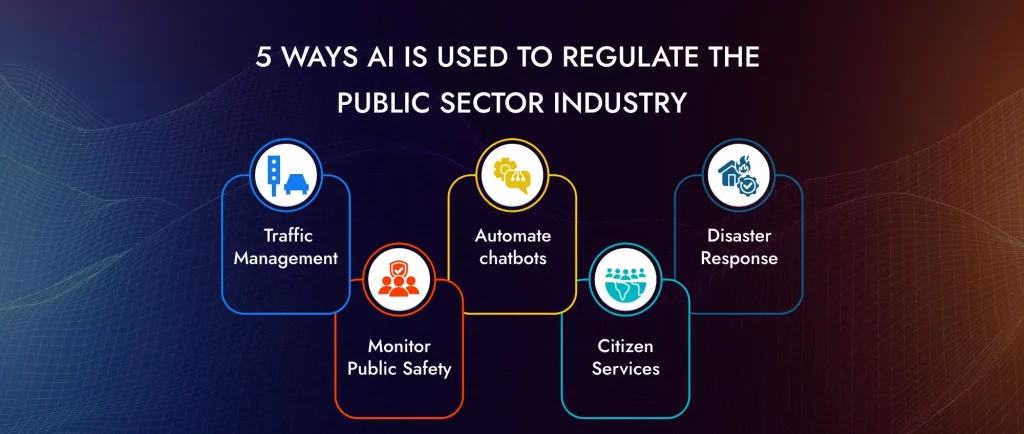
5 ways AI is Used to Regulate the Public Sector Industry

1. Traffic Management

According to the World Health Organization (WHO), about 1.3 million people die annually from road traffic crashes. Governments can significantly mitigate road safety issues by effectively employing AI in transportation.

Technological advancements such as computer vision, object detection, drone tracking, and camera-based traffic systems enable government organizations to analyze crash data and pinpoint high-risk areas. They can proactively prevent future accidents by implementing additional road safety measures based on these analyses.

Furthermore, AI and machine learning algorithms provide data-driven insights that assist officials in managing traffic flow, reducing accidents and congestion, optimizing logistics, and enhancing overall road safety.

For instance, the U.S. Department of Energy has developed the Transportation State Estimation Capability (TranSEC), an AI tool that uses machine learning to analyze traffic patterns. Even with incomplete or limited traffic data, TranSEC provides real-time street-level estimations of vehicle movements, aiding in efficient traffic management.

2. Monitor Public Safety

By leveraging advanced technologies like computer vision, predictive analytics, and machine learning, AI is crucial in public safety monitoring. These systems offer real-time surveillance, threat detection, faster response times, and safety enhancements.

AI-powered public sector cameras and drones can monitor crowd activities and notify security agencies of suspicious occurrences. Therefore, this proactive approach helps in crime prevention. By evaluating past criminal records, AI algorithms can forecast future hotspots for crime so that law enforcement agencies distribute their resources efficiently and stop crimes before they happen.

Artificial intelligence systems can track congestion patterns, identify accidents, improve traffic flow, and enhance road safety. These systems also have features that enable automated penalties against traffic offenses, hence ensuring adherence to traffic rules.

3. Automate chatbots

Every day, government officials interact with citizens, answering their questions. With the help of artificial intelligence-based chatbots, these interactions can be automated, allowing employees to work on other complicated matters.

These chatbots provide citizens with extensive knowledge, offer multilingual assistance, and collect wide-scale feedback from the population. For example, the United States Army recruitment website has a virtual assistant called SGT STAR, with which members have made more than ten million interactions with the public. It acts like a guide through its platform and answers some basic questions until it leads users toward human attendants if needed.

In the US, the Department of Homeland Security also uses an EMMA, a virtual assistant for immigration services. On average, one million applicants contact her monthly to be shown some services in this department and given links to relevant pages and resources.

4. Citizen Services

AI-powered virtual assistants and chatbots can address multiple citizen inquiries, provide government service details, and assist with complicated processes. By doing so, they reduce human employee pressure and speed up response time frames.

Additionally, AI automates routine administrative tasks, including application processing, document verification, permit issuance, etc. This speeds up service delivery and reduces the chances of errors and fraud.

5. Disaster Response

AI can predict disasters such as floods, earthquakes, and hurricanes by analyzing data from diverse sources like weather patterns, seismic activity, and social media. Early warning systems are put in place for timely evacuations and preparations that will alert authorities and people before it happens.

During an incident, AI helps allocate resources more effectively by considering real-time information to determine areas that need the most help. This way, help can be provided to reach these distressed locations faster and more efficiently.

After a disaster, AI-enabled drones and satellite imagery detect the level of damage, which is important data for rescue operations. AI also aids in mapping out affected regions and manages the coordinated response on the ground.

Transform Public Sector Efficiency with AI

Discover how AI in the public sector can boost productivity and decision-making. Get in touch for tailored solutions.

What is the Role of AI in the Public Sector Industries?

AI automates tasks like data processing and citizen interaction. AI is changing public sector industries by improving efficiency as well as service delivery.
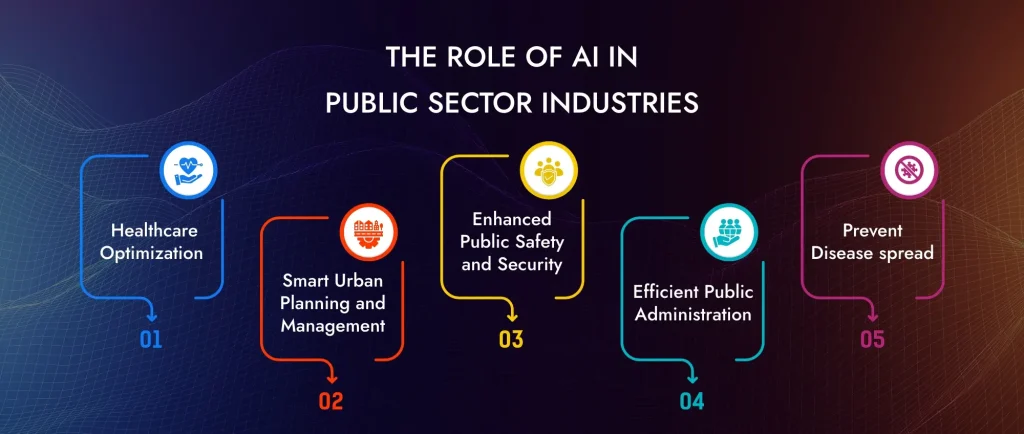
The Role of AI in Public Sector Industries

1. Healthcare Optimization

Medical science is an ever-evolving area with many opportunities for research & development. One highlighted recent Kubecon conference has been securing MLOps within the life sciences industry correctly: why?

However, artificial intelligence (AI) and machine learning (ML) have many other applications in healthcare besides this. For instance, governments can significantly improve their healthcare services using AI. Such improvements include tracking disease spread, monitoring patients’ health metrics continuously, and optimizing medicine planning and distribution.

These projects often involve working with highly sensitive content. Consequently, securing all artifacts ensures compliance standards are met while allowing multi-tenancy capabilities is important. There are abundant numerical figures available for AI/ML algorithms, including medical images, sensors, etc.

Some notable outcomes include:

  • Early detection of diseases via advanced analysis of medical images
  • Improved management of patient records through utilization of historical data insights
  • Facilitation of robot-assisted surgeries aimed at better precision and outcomes

2. Smart Urban Planning and Management

Urban planning & management today benefit greatly from AI, making cities more efficient, sustainable, and livable. Urban planners can make informed decisions to improve the quality of life with the help of AI-powered tools.

Smart cities use AI to optimize their consumption and manage resources like water, power, or waste. Sensors and IoT devices gather data, which is then optimized to reduce wastage through AI algorithms.

AI-driven simulations, in addition to predictive modeling, assist planners in developing infrastructure that meets the needs of a growing population. This involves optimizing the placement of utilities, public services, and green spaces.

3. Enhanced Public Safety and Security

Real-time computer vision and pattern recognition enable AI-powered surveillance systems to detect suspicious activities and potential threats. This helps prevent criminal activities by detecting them before they occur.

AI algorithms can identify patterns from historical crime data and predict future crime hotspots. In this way, law enforcement agencies can deploy resources strategically, thereby preventing crimes before they happen and improving community safety.

4. Efficient Public Administration

Citizens can access information and services via AI chatbots or virtual assistants. Such tools can handle a variety of queries – from questions about public services to guiding users through application processes – thus enhancing the user experience as a whole.

That aside, AI allows governments to generate decisions by analyzing large volumes of data for trends and insights. This helps in policy development, resource allocation, and performance evaluation to ensure public services are delivered effectively and efficiently.

5. Prevent Disease spread

AI in healthcare has made remarkable strides in medical science, ranging from early detection of diseases to prevention and clinical decision support.

Real-time monitoring of patients’ health is done by artificial intelligence, which tracks their weight, height, blood sugar levels, stress levels, and heart rate. Such information is then fed into an artificial intelligence healthcare system, which informs doctors about potential risks.

Governments can utilize AI to enhance public health services. For example, AI was crucial in detecting and controlling the COVID-19 virus during the pandemic. The NHS has developed an AI tool that can detect heart disease in just 20 seconds while the patient is still in an MRI scanner, a process that would typically take a doctor 13 minutes or more to analyze manually.

The U.S. Centers for Disease Control and Prevention (CDC) uses AI to streamline poliovirus tracking and reporting. This tool identifies virus types and clusters disease reports.

Empower Your Public Services with AI

Explore AI’s impact on the public sector. Partner with ViitorCloud for seamless AI integration.

How to ViitorCloud Implement AI Solutions in the Public Sector?

Implementing artificial intelligence in the public sector requires more than just technology—it demands a tailored approach that aligns with your unique challenges and goals. At ViitorCloud, we offer comprehensive AI solutions that help you streamline operations, improve services, and deliver impactful results for citizens.

Here’s how ViitorCloud can lead your organization toward AI success:

  1. Identify and solve key challenges: From optimizing administrative tasks to enhancing traffic management, ViitorCloud works closely with you to pinpoint specific problems that AI in the public sector can solve, such as boosting public health initiatives or streamlining service delivery.
  2. Engage the right decision-makers: With our expertise in public sector collaborations, we help you bring together government officials, department heads, and policymakers to ensure full alignment and secure necessary buy-in for your AI initiatives.
  3. Tailored AI technologies: Whether it’s machine learning, natural language processing, computer vision, or robotic automation, we design custom solutions to fit your organization’s objectives. ViitorCloud delivers cutting-edge AI tools to drive the outcomes that matter most.

Partner with ViitorCloud to implement transformative AI public sector solutions that deliver measurable results. Let’s discuss how we can bring your vision to life and make your organization a leader in the future of public services.

Ready to transform your public sector operations with AI? Contact ViitorCloud today!

Future of AI in the Public Sector Industry

The future of AI in the public sector looks quite promising, thereby giving rise to transformative AI public sector solutions towards long-standing hurdles within this domain. Nevertheless, this journey is challenging. Public organizations need help with dealing with legacy systems and addressing data paucity. However, robotic process automation (RPA), computer vision, and natural language processing (NLP) are innovations that will make the department efficient and responsive.

So far, this has limited how much the wider corporate world has been able to adopt artificial intelligence and machine learning. However, RPA has changed everything about government paperwork handling by enabling digitization and automating repetitive tasks. This has led to efficiency in operations, thereby releasing major resources for superior strategic initiatives.

Public sector organizations can also benefit from NLP and computer vision. Where textual data is concerned, the AI public sector technology of NLP assists in extracting large volumes of such materials, while computer vision can interpret visual information from sources like surveillance cameras and medical imaging. The use of AI in the public sector industry is important as it helps to recognize patterns dealing with climate change and public health and predict and mitigate potential crises accordingly.

Redefine Public Sector Operations through AI

Learn how AI in the public sector drives innovation. Let us help you implement the right solutions.

Transform Your Public Sector with ViitorCloud’s Cutting-Edge AI Solutions

In today’s fast-paced world, leveraging artificial intelligence in the public sector is no longer optional—it’s essential. At ViitorCloud, we deliver transformative AI development services that enhance efficiency, streamline service delivery, and make data-driven decisions a reality. From smart urban planning to improved public safety, our AI solutions offer innovative ways to tackle longstanding challenges.

ViitorCloud is at the forefront of reshaping government processes with AI. Our advanced predictive tools empower law enforcement agencies to monitor and respond to potential threats in real-time, boosting community safety and reducing crime rates. With our AI-powered systems, you can elevate your operations, improve public administration, and ensure your city thrives in a digital-first world.

Partner with ViitorCloud to lead the change. Our AI expertise is the key to unlocking smarter, safer, and more efficient public sector services.

Ready to transform? Let ViitorCloud’s AI solutions power your public sector success.


Frequently Asked Questions

AI automates tasks, enhances decision-making, improves service delivery, and tackles complex issues such as healthcare access or transportation logistics using data analysis and predictive modeling.

AI in the public sector helps streamline its activities, boost efficiency, eliminate human errors, enhance the allocation of resources, and provide better services through the analysis of data as well as automated operations.

Through repetitive task automation, accuracy minimization, resource utilization optimization, and operational efficiency improvement, AI cuts down on expenses so that employees in public sectors may perform more crucial or even intricate work.

Yes, AI in the public sector can be safe if implemented with proper data security measures, ethical guidelines, and continuous monitoring to ensure compliance with regulations and protect sensitive information.

Building Scalable APIs with Node.js and Express

Node.js and Express have become essential tools in building scalable APIs, which are crucial for maintaining high performance and ensuring seamless user experiences. With its event-driven architecture, Node.js is highly efficient in managing the growing demands for real-time applications, making it a top choice for backend development. A study found that 68% of developers reported increased productivity with Node.js, largely due to its capability to use JavaScript on both the client and server sides, thus simplifying the development process. In this blog, we’ll provide a step-by-step guide with precise code examples to help you build scalable APIs using Node.js and Express.

Key Principles for Building Scalable APIs

Node.js is inherently asynchronous, allowing it to handle multiple requests simultaneously without blocking the event loop. This feature is crucial for scalability, enabling efficient resource management, particularly under high-load conditions.

Adopting a modular approach is essential. By breaking down the application into smaller, self-contained modules, developers can manage complexity and facilitate independent scaling. Each module should focus on a specific functionality, which allows for easier testing, maintenance, and scaling of individual components as needed.

Utilizing a microservices architecture can significantly enhance scalability. This approach allows different parts of the application to be scaled independently, optimizing resource use and improving overall performance. Each microservice can be developed, deployed, and scaled without affecting other services.

Express.js simplifies the creation of routes and the integration of middleware. Middleware functions can handle tasks such as authentication, logging, and error handling, making the API more robust and easier to manage. Properly organizing routes and controllers is vital for maintaining clarity and efficiency in the codebase.

Implementing comprehensive error handling and logging mechanisms is crucial for maintaining API stability. This ensures that issues can be quickly identified and resolved, minimizing downtime and enhancing user experience.

Using tools like Swagger for API documentation is recommended. Well-documented APIs not only facilitate easier onboarding for new developers but also ensure that the API is user-friendly for consumers, enabling better integration and usage.

Optimizing code for performance is critical. Techniques include minimizing synchronous operations, managing resource consumption, and leveraging caching strategies (e.g., using Redis) to reduce database load and improve response times.

Regular load testing is essential to identify potential bottlenecks and ensure the API can handle anticipated traffic spikes. Monitoring key metrics such as response times and error rates can guide necessary adjustments and scaling strategies.

Build Fast, Scalable APIs with Our Expert Team

Partner with ViitorCloud to drive efficiency through Node.js and Express APIs.

How to Build Scalable API with Node.js and Express

1. Setup Your Project

We created a scalable-api folder. Open this folder inside your code editor.

then follow the instructions below.

To Initialize a new Node.js project run the below command.

npm init -y

Once you run the above command, your package.json file will be created inside the folder.

Now, you have to run the below command to install Express.

npm install express

Once you run the above command, the node_modules folder & package-lock.json file will be created in the root folder.

2. Creating the Server

Now that you already installed Express, your next step is to create your server file and set up a basic Express server.

You have to create a file named app.js in the root folder.

Now, you created your file app.js and set up a basic Express server in app.js.

const express = require('express'); 
const app = express(); 
const port = process.env.PORT || 3000; 
 
// Middleware to parse JSON bodies 
app.use(express.json()); 
 
// Basic route 
app.get('/', (req, res) => { 
    res.send('Hello World!'); 
}); 
 
// Start the server 
app.listen(port, () => { 
    console.log(`Server is running on port ${port}`); 
}); 

Now, once you are done, run your server by executing the following command in your terminal.

node app.js

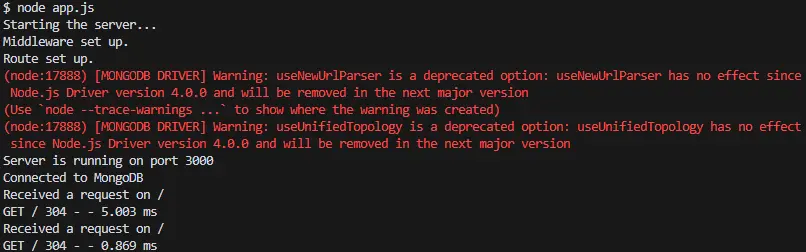
Once you run the above command, you’ll see the below message in your terminal

Starting the server…
Middleware set up.
Route set up.
Server is running on port 3000

And to access the server, open your Chrome browser or whichever you’re using and navigate to “http://localhost:3000”, You’ll see the “Hello World” message.

Build Scalable API with Node.js and Express

As shown in the above screen.

The next steps for building scalable APIs with Node.js and Express typically involve.

3. Defining & Adding More Routes

You have to define additional routes to handle different endpoints. For example, let’s add routes for /api and /users.

// ... existing code ... 
 
// New route for /api 
app.get('/api', (req, res) => { 
    res.send('API endpoint'); 
}); 
 
// New route for /users 
app.get('/users', (req, res) => { 
    res.send('Users endpoint'); 
}); 
 
// ... existing code ... 

You can add the above code in your app.js file and update your app.js file.

  • app.get(‘/api’, (req, res) => { … }): This defines a new route that listens for GET requests on the /api endpoint. When a request is received, it sends back the response “API endpoint”.
  • app.get(‘/users’, (req, res) => { … }): This defines another route that listens for GET requests on the /users endpoint. When a request is received, it sends back the response “Users endpoint”.

Now, let’s test the new routes.

start your server by running:

node app.js

Now, open your browser, and go to “http://localhost:3000/api”, you’ll see the message “API endpoint”

Build Scalable API with Node.js and Express

Now, you should navigate to “http://localhost:3000/users”, you’ll see the message “Users endpoint”, shown in the below screen.

Build Scalable API with Node.js and Express

Now, your next step will be to connect to a database. For this, we’ll use MongoDB with Mongoose, a popular ODM (Object Data Modeling) library for MongoDB and Node.js.

4. Connecting to a Database.

You’ve to run the following command to install the Mongoose.

npm install mongoose

Let’s see how you can update your app.js file to connect to the MongoDB database.

  const mongoose = require('mongoose'); 
 
   // Connect to MongoDB 
   mongoose.connect('mongodb://localhost:27017/mydatabase', { useNewUrlParser: true, useUnifiedTopology: true }) 
       .then(() => console.log('Connected to MongoDB')) 
       .catch(err => console.error('Could not connect to MongoDB', err)); 
 
   // ... existing code ... 

Connect to MongoDB: Use mongoose.connect to connect to your MongoDB database. Replace ‘mongodb://localhost:27017/mydatabase’ with your actual MongoDB connection string if it’s different.

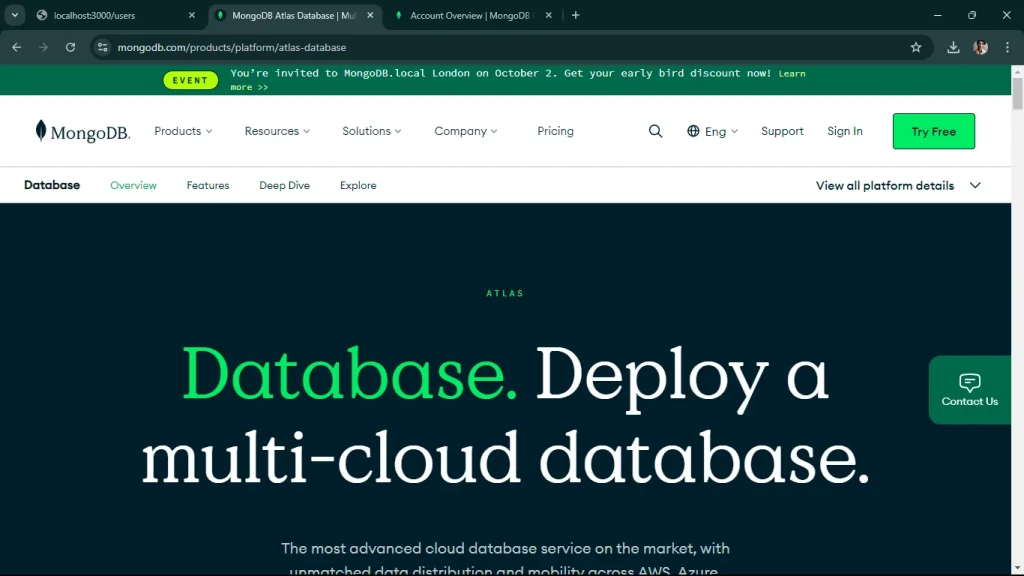
Now, for that, You must first set up your MongoDB. If you haven’t, let’s set it up now. Use MongoDB Atlas (Cloud Database). You have to create a MongoDB Atlas account, Go to MongoDB Atlas and sign up for a free account.

Build Scalable API with Node.js and Express

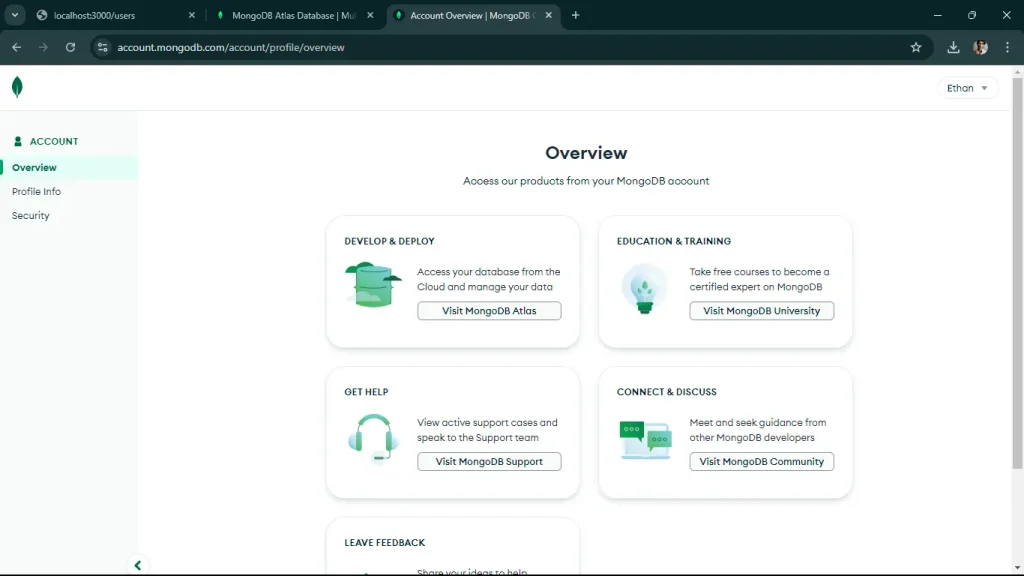
Once you sign up via Google or GitHub Account, You’ll see the below screen after login.

Build Scalable API with Node.js and Express

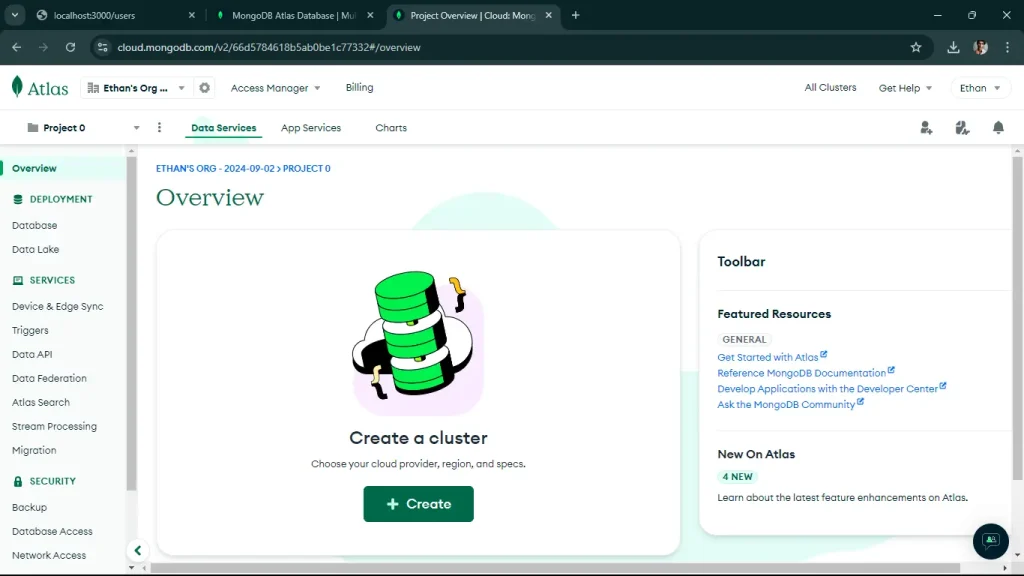
You’ll to click on Visit MongoDB Atlas, Click on Create a New Cluster.

Build Scalable API with Node.js and Express

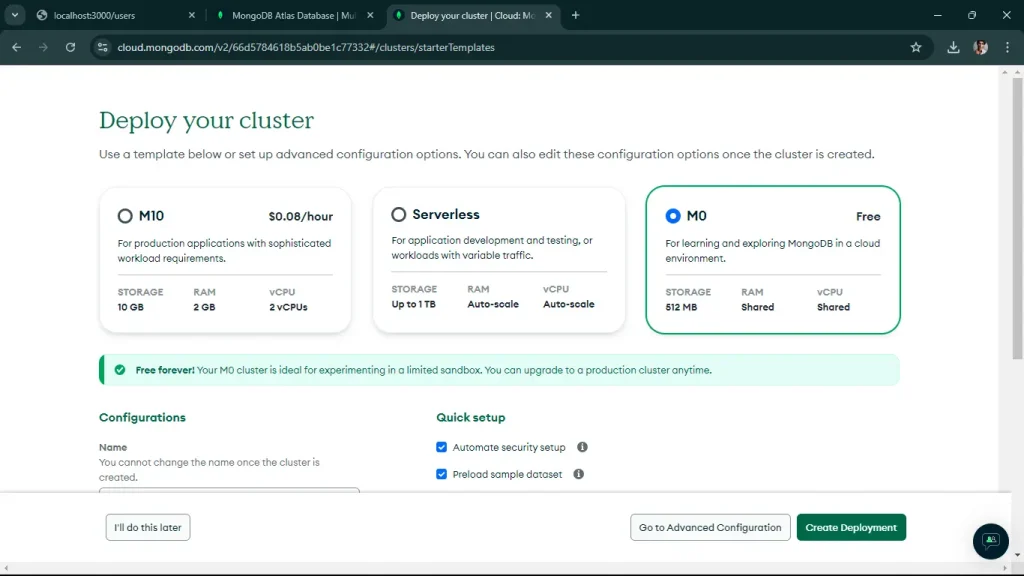
Once you click on Create as shown in the above screen, you’ll be redirected to the below screen, select M0 free version.

You have to keep your configuration as it is by default, now click on Create Deployment.

Build Scalable API with Node.js and Express

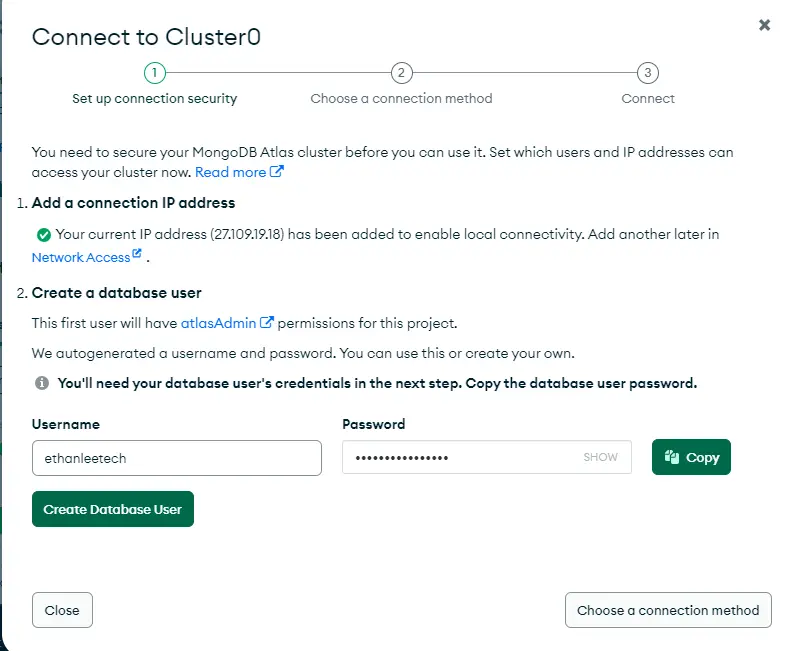
Once you click on that, you’ll come to this screen.

Build Scalable API with Node.js and Express

You’ve to note down, your username and password, once you click on “Create Database User”

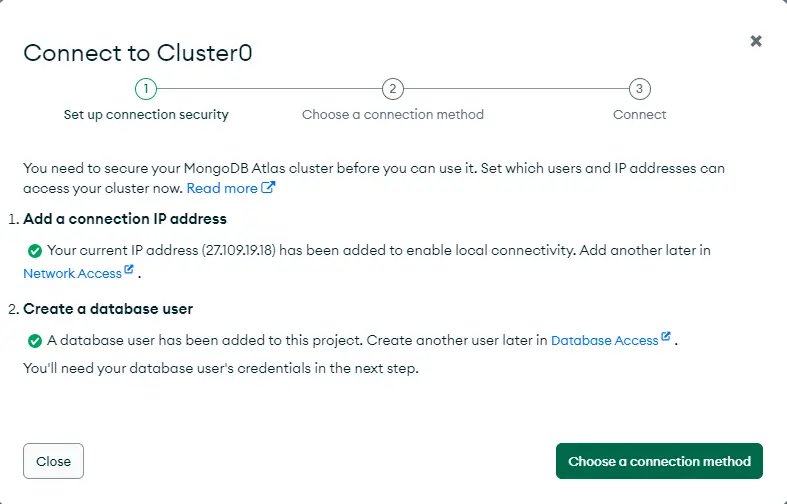
Build Scalable API with Node.js and Express

Once you click on “Choose a connection method”

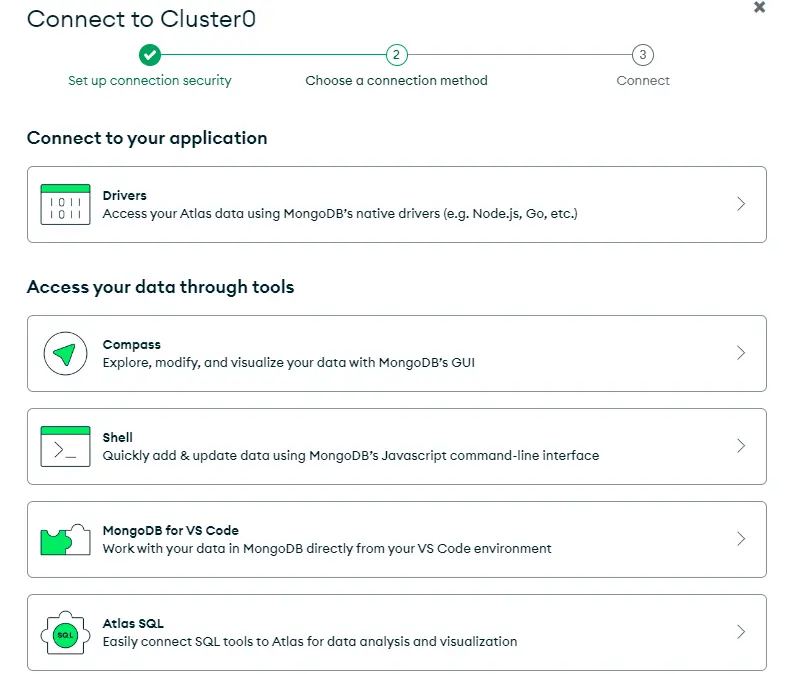
Build Scalable API with Node.js and Express

Now, choose “Connect to your application”, You’ll see the screen below.

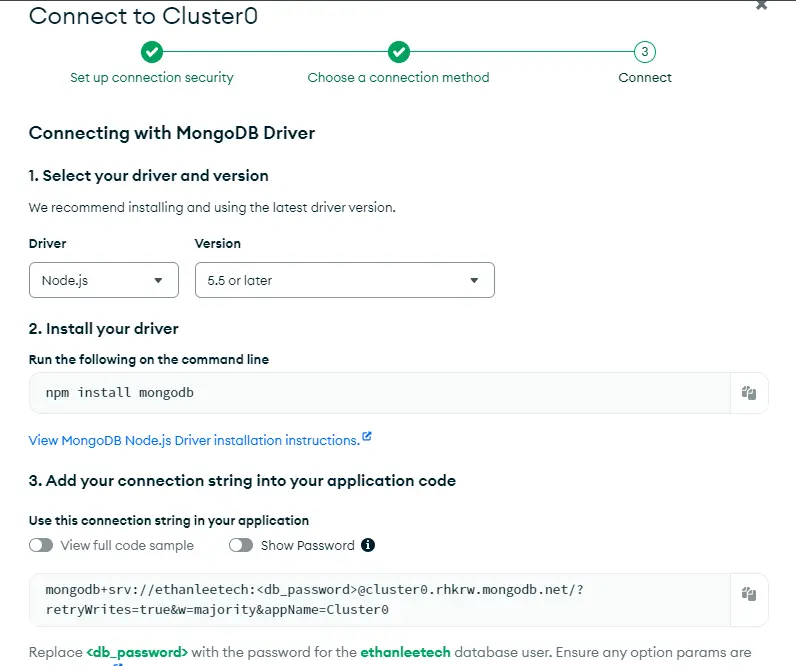
Build Scalable API with Node.js and Express

Now, you’ll see a connection string like this – mongodb+srv://:@cluster0.mongodb.net/myFirstDatabase?retryWrites=true&w=majority

replace it with your username and password you noted down earlier.

Now, you have to copy your MongoDB string and replace it in your app.js code, and you have to update it.

Now, you can run your node app.js file again in your terminal. You’ll see the message “Connected to MongoDB”

Build Scalable API with Node.js and Express

5. Implementing Middleware

So, now you see the above successful message, now, the next step is to add simple logging middleware using Morgan which is a popular HTTP request logger middleware for Node.js.

To install Morgan, run the below command.

npm install morgan

Now, you’ve to update your app.js file to use Morgan.

const express = require('express'); 
   const morgan = require('morgan'); // Import morgan 
   const app = express(); 
   const port = process.env.PORT || 3000; 
 
   console.log('Starting the server...'); 
 
   const mongoose = require('mongoose'); 
 
   // Replace with your actual MongoDB connection string 
   const mongoURI = 'mongodb+srv://<username>:<password>@cluster0.mongodb.net/myFirstDatabase?retryWrites=true&w=majority'; 
 
   mongoose.connect(mongoURI, { useNewUrlParser: true, useUnifiedTopology: true }) 
       .then(() => console.log('Connected to MongoDB')) 
       .catch(err => console.error('Could not connect to MongoDB', err)); 
 
   // Middleware to parse JSON bodies 
   app.use(express.json()); 
 
   // Use morgan for logging 
   app.use(morgan('tiny')); 
 
   console.log('Middleware set up.'); 
 
   // Basic route 
   app.get('/', (req, res) => { 
       console.log('Received a request on /'); 
       res.send('Hello World!'); 
   }); 
 
   // New route for /api 
   app.get('/api', (req, res) => { 
       res.send('API endpoint'); 
   }); 
 
   // New route for /users 
   app.get('/users', (req, res) => { 
       res.send('Users endpoint'); 
   }); 
 
   console.log('Route set up.'); 
 
   // Start the server 
   app.listen(port, () => { 
       console.log(`Server is running on port ${port}`); 
   }); 

Now, run your node app.js, go to “http://localhost:3000/” and you’ll see a log entry for the request in the terminal. This step will add basic logging to your application.

Your next step is to define a schema and model for your MongoDB collections using Mongoose. This will allow you to interact with your database in a structured way.

6. Define a Schema and Model

You have to create a new file named user.js in a models directory you may need to create the models directory if it doesn’t exist). You’ve defined a User Schema and model for users.

  const mongoose = require('mongoose'); 
 
   // Define the User schema 
   const userSchema = new mongoose.Schema({ 
       name: { 
           type: String, 
           required: true 
       }, 
       email: { 
           type: String, 
           required: true, 
           unique: true 
       }, 
       password: { 
           type: String, 
           required: true 
       } 
   }); 
 
   // Create the User model 
   const User = mongoose.model('User', userSchema); 
 
   module.exports = User; 

Now, you’ve to update the app.js to Use the User Model:

In app.js, import the User model and create a route to add a new user:

const express = require('express'); 
   const morgan = require('morgan'); 
   const mongoose = require('mongoose'); 
   const User = require('./models/user'); // Import the User model 
   const app = express(); 
   const port = process.env.PORT || 3000; 
 
   console.log('Starting the server...'); 
 
   // Replace with your actual MongoDB connection string 
   const mongoURI = 'mongodb+srv://<username>:<password>@cluster0.mongodb.net/myFirstDatabase?retryWrites=true&w=majority'; 
 
   mongoose.connect(mongoURI, { useNewUrlParser: true, useUnifiedTopology: true }) 
       .then(() => console.log('Connected to MongoDB')) 
       .catch(err => console.error('Could not connect to MongoDB', err)); 
 
   // Middleware to parse JSON bodies 
   app.use(express.json()); 
 
   // Use morgan for logging 
   app.use(morgan('tiny')); 
 
   console.log('Middleware set up.'); 
 
   // Basic route 
   app.get('/', (req, res) => { 
       console.log('Received a request on /'); 
       res.send('Hello World!'); 
   }); 
 
   // New route for /api 
   app.get('/api', (req, res) => { 
       res.send('API endpoint'); 
   }); 
 
   // New route for /users 
   app.get('/users', (req, res) => { 
       res.send('Users endpoint'); 
   }); 
 
   // Route to add a new user 
   app.post('/users', async (req, res) => { 
       try { 
           const user = new User(req.body); 
           await user.save(); 
           res.status(201).send(user); 
       } catch (error) { 
           res.status(400).send(error); 
       } 
   }); 
 
   console.log('Route set up.'); 
 
   // Start the server 
   app.listen(port, () => { 
       console.log(`Server is running on port ${port}`); 
   }); 

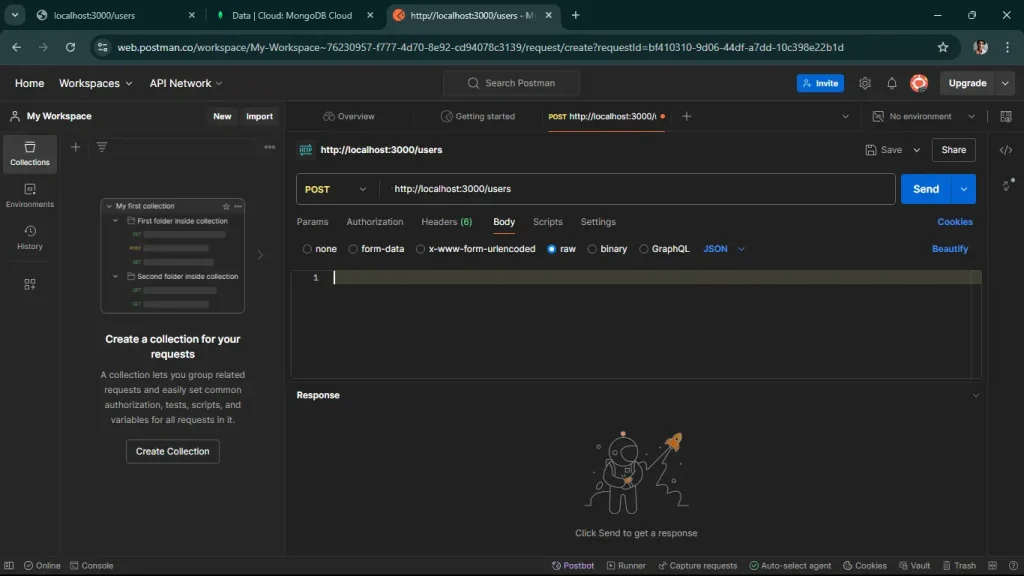
Now, that you’ve to open Postman, remember that you have to use the desktop Postman agent, click on a new request, select request type to “Post”, and Enter the URL – “http://localhost:3000/users” Now, select the body tab, select row, and json there.

Build Scalable API with Node.js and Express

Enter the following json in the text area.

{ 
         "name": "John Doe", 
         "email": "john.doe@example.com", 
         "password": "password123" 
     } 

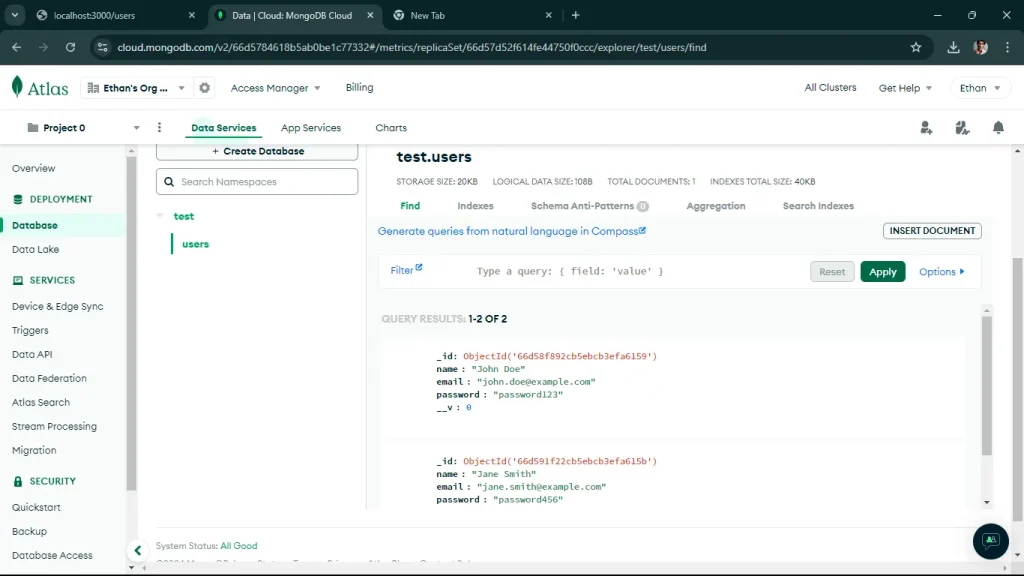
Once you send the request, it will reflect in your MongoDB Atlas account, you must go to the database and select cluster0, find the database you’ve created, go to the user, and here you’ll find the information you send via a request. just like the screen below.

Build Scalable API with Node.js and Express

7. Implemented CRUD Operations:

As we successfully added users to your MongoDB database, the next step is to implement additional CRUD (Create, Read, Update, Delete) operations for your User model. This will allow you to manage users more effectively.

Let’s start by adding routes for reading, updating, and deleting users.

Add a route to get all users and a route to get a user by ID.

// ... existing code ... 
 
// Route to get all users 
app.get('/users', async (req, res) => { 
    try { 
        const users = await User.find(); 
        res.send(users); 
    } catch (error) { 
        res.status(500).send(error); 
    } 
}); 
 
// Route to get a user by ID 
app.get('/users/:id', async (req, res) => { 
    try { 
        const user = await User.findById(req.params.id); 
        if (!user) { 
            return res.status(404).send('User not found'); 
        } 
        res.send(user); 
    } catch (error) { 
        res.status(500).send(error); 
    } 
}); 
 
// ... existing code ... 

Add a route to update a user by ID.

// ... existing code ... 
 
// Route to update a user by ID 
app.put('/users/:id', async (req, res) => { 
    try { 
        const user = await User.findByIdAndUpdate(req.params.id, req.body, { new: true, runValidators: true }); 
        if (!user) { 
            return res.status(404).send('User not found'); 
        } 
        res.send(user); 
    } catch (error) { 
        res.status(400).send(error); 
    } 
}); 
 
// ... existing code ... 

Add a route to delete a user by ID.

// ... existing code ... 
 
// Route to delete a user by ID 
app.delete('/users/:id', async (req, res) => { 
    try { 
        const user = await User.findByIdAndDelete(req.params.id); 
        if (!user) { 
            return res.status(404).send('User not found'); 
        } 
        res.send(user); 
    } catch (error) { 
        res.status(500).send(error); 
    } 
}); 
 
// ... existing code ... 

once, you update the above code in your app.js file,

start your server using the node app.js command,

now, send a request to get all users: You’ll see the below screen, in your “http://localhost:3000/users”

Build Scalable API with Node.js and Express

When you run get user by ID, you’ll see it in the terminal as well on the local host as well.

Build Scalable API with Node.js and Express

When you update any information, you’ll be able to see it here. we changed the name from John Doe to Ethan Lee,

Build Scalable API with Node.js and Express

When you run a delete request, one user will be deleted.

Build Scalable API with Node.js and Express

So, we successfully implemented and tested all the basic CRUD Operations for your API.

8. Implement Error Handling Middleware

Centralized error handling helps manage errors gracefully and provides consistent error responses.

// ... existing code ... 
 
   // Error handling middleware 
   app.use((err, req, res, next) => { 
       console.error(err.stack); 
       res.status(500).send({ error: 'Something went wrong!' }); 
   }); 
 
   // Start the server 
   app.listen(port, () => { 
       console.log(`Server is running on port ${port}`); 
   }); 

9. Use Environment Variables

Using environment variables helps manage configuration settings securely.

npm install dotenv 
PORT=3000 
MONGODB_URI=mongodb+srv://<username>:<password>@cluster0.mongodb.net/myFirstDatabase?retryWrites=true&w=majority 

this is your updated app.js

require('dotenv').config(); 
   const express = require('express'); 
   const morgan = require('morgan'); 
   const mongoose = require('mongoose'); 
   const cors = require('cors'); 
   const User = require('./models/user'); 
   const app = express(); 
   const port = process.env.PORT || 3000; 
 
   console.log('Starting the server...'); 
 
   mongoose.connect(process.env.MONGODB_URI, { useNewUrlParser: true, useUnifiedTopology: true }) 
       .then(() => console.log('Connected to MongoDB')) 
       .catch(err => console.error('Could not connect to MongoDB', err)); 
 
   // Middleware to parse JSON bodies 
   app.use(express.json()); 
 
   // Use morgan for logging 
   app.use(morgan('tiny')); 
 
   // Use cors for handling CORS issues 
   app.use(cors()); 
 
   console.log('Middleware set up.'); 
 
   // Basic route 
   app.get('/', (req, res) => { 
       console.log('Received a request on /'); 
       res.send('Hello World!'); 
   }); 
 
   // CRUD routes 
   // ... existing CRUD routes ... 
 
   // Error handling middleware 
   app.use((err, req, res, next) => { 
       console.error(err.stack); 
       res.status(500).send({ error: 'Something went wrong!' }); 
   }); 
 
   console.log('Route set up.'); 
 
   // Start the server 
   app.listen(port, () => { 
       console.log(`Server is running on port ${port}`); 
   }); 

10. Add Basic Authentication

For a more secure API, you might want to add basic authentication. Here’s a simple example using HTTP Basic Auth:

npm install express-basic-auth 
const basicAuth = require('express-basic-auth'); 
 
   // ... existing code ... 
 
   // Use basic auth for all routes 
   app.use(basicAuth({ 
       users: { 'admin': 'supersecret' }, 
       challenge: true 
   })); 
 
   // ... existing code ... 

11. Document Your API

Using tools like Swagger can help you document your API endpoints.

npm install swagger-ui-express swagger-jsdoc 

Create a swagger.js file in the root folder, you’ve to add the following code to your file.

const swaggerJsDoc = require('swagger-jsdoc'); 
const swaggerUi = require('swagger-ui-express'); 
 
const swaggerOptions = { 
    swaggerDefinition: { 
        openapi: '3.0.0', 
        info: { 
            title: 'User API', 
            version: '1.0.0', 
            description: 'A simple Express User API' 
        }, 
        servers: [ 
            { 
                url: '<http://localhost:3000>' 
            } 
        ] 
    }, 
    apis: ['./app.js'] // Path to the API docs 
}; 
 
const swaggerDocs = swaggerJsDoc(swaggerOptions); 
 
module.exports = (app) => { 
    app.use('/api-docs', swaggerUi.serve, swaggerUi.setup(swaggerDocs)); 
}; 

Add the following code to your app.js file to set up Swagger:

update your app.js file

require('dotenv').config(); 
const express = require('express'); 
const morgan = require('morgan'); 
const mongoose = require('mongoose'); 
const cors = require('cors'); 
const User = require('./models/user'); 
const setupSwagger = require('./swagger'); // Import the Swagger setup function 
const app = express(); 
const port = process.env.PORT || 3000; 
 
console.log('Starting the server...'); 
 
mongoose.connect(process.env.MONGODB_URI, { useNewUrlParser: true, useUnifiedTopology: true }) 
    .then(() => console.log('Connected to MongoDB')) 
    .catch(err => console.error('Could not connect to MongoDB', err)); 
 
// Middleware to parse JSON bodies 
app.use(express.json()); 
 
// Use morgan for logging 
app.use(morgan('tiny')); 
 
// Use cors for handling CORS issues 
app.use(cors()); 
 
console.log('Middleware set up.'); 
 
// Basic route 
app.get('/', (req, res) => { 
    console.log('Received a request on /'); 
    res.send('Hello World!'); 
}); 
 
// CRUD routes 
// ... existing CRUD routes ... 
 
// Setup Swagger 
setupSwagger(app); 
 
// Error handling middleware 
app.use((err, req, res, next) => { 
    console.error(err.stack); 
    res.status(500).send({ error: 'Something went wrong!' }); 
}); 
 
console.log('Route set up.'); 
 
// Start the server 
app.listen(port, () => { 
    console.log(`Server is running on port ${port}`); 
}); 

Add comments to your routes in app.js to document them with Swagger. Let’s see an example for the GET /users route:

/** 
 * @swagger 
 * /users: 
 *   get: 
 *     summary: Retrieve a list of users 
 *     responses: 
 *       200: 
 *         description: A list of users 
 *         content: 
 *           application/json: 
 *             schema: 
 *               type: array 
 *               items: 
 *                 type: object 
 */ 
app.get('/users', async (req, res) => { 
    try { 
        const users = await User.find(); 
        res.send(users); 
    } catch (error) { 
        res.status(500).send(error); 
    } 
}); 
 
/** 
 * @swagger 
 * /users/{id}: 
 *   get: 
 *     summary: Retrieve a single user by ID 
 *     parameters: 
 *       - in: path 
 *         name: id 
 *         required: true 
 *         schema: 
 *           type: string 
 *         description: The user ID 
 *     responses: 
 *       200: 
 *         description: A single user 
 *         content: 
 *           application/json: 
 *             schema: 
 *               type: object 
 *       404: 
 *         description: User not found 
 */ 
app.get('/users/:id', async (req, res) => { 
    try { 
        const user = await User.findById(req.params.id); 
        if (!user) { 
            return res.status(404).send('User not found'); 
        } 
        res.send(user); 
    } catch (error) { 
        res.status(500).send(error); 
    } 
}); 
 
// Add similar comments for other routes... 

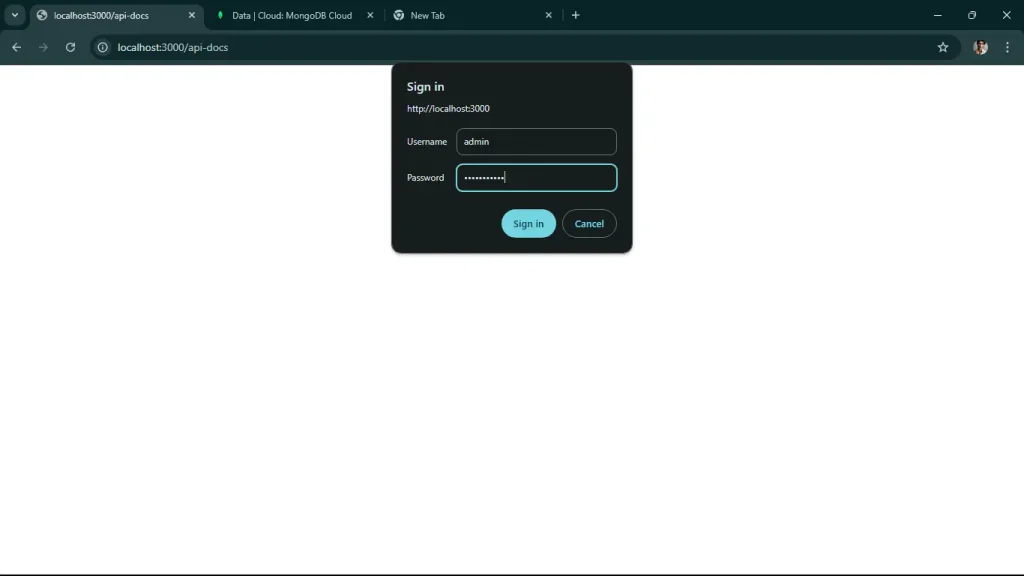
Now, when you go to “http://localhost:3000/api-docs”, use your username and password which is in app.js

Build Scalable API with Node.js and Express

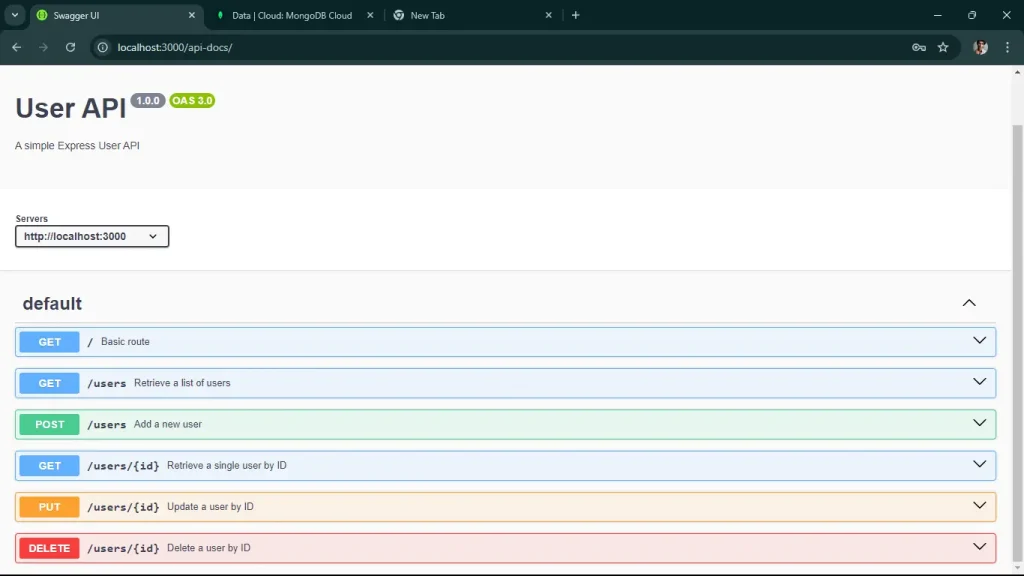
You’ll get this, you should be able to access the Swagger UI and see the documentation for your API.

Build Scalable API with Node.js and Express

You have successfully built a scalable API with Node.js and Express, complete with CRUD operations, basic authentication, and API documentation using Swagger. You can deploy your API over the cloud which makes it accessible to all people on the internet, you can use services like Heroku for deployment.

Scale Your Business with Custom API Solutions

Discover how we deliver robust APIs with Node.js and Express that grow with your business.

Conclusion

Building scalable APIs with Node.js and Express requires a strategic approach, including modular architecture, optimized performance with non-blocking I/O, clustering, efficient database management, and robust security measures. By implementing caching, monitoring tools, and auto-scaling, your API can handle thousands of requests per second, ensuring reliability and performance under heavy loads.

Ready to scale your API with Node.js and Express? Contact us today to build a future-proof API solution for your business needs!


Frequently Asked Questions

Node.js offers several advantages for API development, including its asynchronous, non-blocking architecture that allows for the simultaneous handling of multiple requests. This leads to improved performance and scalability. Additionally, Node.js uses JavaScript, enabling developers to work across both the client and server sides, streamlining the development process.

Express.js is a minimal and flexible web application framework that simplifies the process of building APIs with Node.js. It provides robust routing, middleware support, and easy integration with various databases, making it an excellent choice for developing RESTful APIs quickly and efficiently.

To ensure your API is scalable, consider implementing a microservices architecture, which allows different components to be scaled independently. Additionally, optimize your code for performance, use caching strategies, and conduct regular load testing to identify and address potential bottlenecks.

Best practices for error handling in Node.js APIs include using middleware to catch errors globally, logging errors for monitoring and debugging, and providing meaningful error messages to clients. It’s also essential to handle different types of errors (e.g., validation errors, database errors) appropriately to enhance user experience.

ViitorCloud offers comprehensive development services tailored to your business needs, specializing in building scalable APIs using Node.js and Express. Our team of experienced developers utilizes best practices in API design and architecture, ensuring that your application can handle high loads efficiently. With a focus on performance optimization and a robust development process, ViitorCloud can help you create APIs that not only meet current demands but also adapt to future growth, providing a strong foundation for your digital solutions.

7 Innovative AI Use Cases in Information Technology

In today’s rapidly developing landscape, businesses grapple with complex IT challenges—ranging from managing intricate operations to ensuring scalability and reliability. The integration of new technologies often adds to this complexity. But with ViitorCloud’s AI solutions, these hurdles become growth opportunities.

By implanting artificial intelligence into your IT operations, ViitorCloud empowers your business to tackle these challenges head-on. From real-time problem identification to predicting future issues and streamlining data management, our AI solutions optimize your IT infrastructure and operations systems, ensuring you stay ahead of the curve.

Curious about the AI use cases in information technology? Want to see how AI is revolutionizing IT operations? Let’s then dive into the details and understand everything. At ViitorCloud, we not only guide you through understanding AI in information technology but also deliver tailored AI development services that align with your business goals.

Why AI is Revolutionizing Information Technology & How ViitorCloud Can Help Your Business Thrive

AI in information technology isn’t just a trend—it’s a transformation. At ViitorCloud, we harness the power of AI to elevate your IT infrastructure, making it more efficient, strategic, and innovative. Our AI development services streamline repetitive tasks, freeing your team to focus on what matters most—driving your business forward. With our advanced AI solutions, we enhance operational processes, enabling your business to solve problems smarter and faster.

READ: Benefits of AI in Information Technology for Startups

Explore AI Use Cases in Information Technology with Us

AI Use Cases in Information Technology

According to the NextMSC, the global AI market will reach $207.9 billion in 2023. AI in information technology improves the IT industry’s operation, efficiency, and productivity.

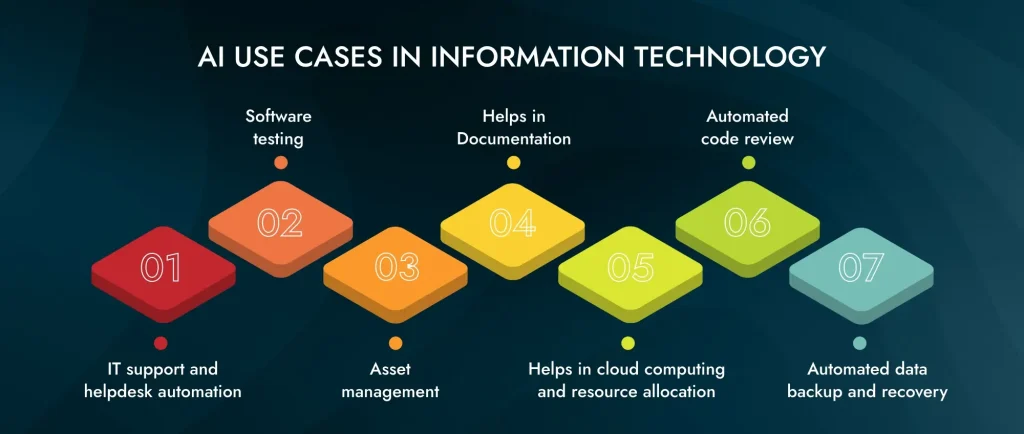
Here are the AI use cases in information technology that enhance the IT business:

AI Use Cases in Information Technology

1. IT Support and Helpdesk Automation

IT support and helpdesk automation solve the issues and streamline the user interaction process. Employees who go through technical issues raise a support request through the chatbot. These automation systems categorize the issue based on its severity and nature. When a problem can be solved with automation, it is solved, and if it needs the help of a human, then a ticket is raised to the appropriate IT personnel to solve the issue.

As a result, efficiency improves in the IT department, and professional people can focus on complex tasks. IT support is one of the AI use cases in IT operations, which improves operations.

2. Software Testing

AI use cases in information technology play a vital role in software testing by automating and improving the testing process. It helps generate test cases, predict areas of code of instability, and adjust the testing strategies based on changing project requirements. This application advances the testing life cycles, ensures fast feedback to developers, and reduces the time to release software testing.

Additionally, AI identifies complex tasks and detects bugs and performance issues. Also, it automates repetitive tasks so the tester can focus on essential testing areas.

3. Asset Management

IT asset management involves tracking and managing assets in the entire lifecycle of IT, including hardware, software, and licenses. It also automates asset discovery, monitors patterns, and predicts when assets need maintenance or replacement. Additionally, AI helps IT professionals maintain necessary inventory and reduce the risk of unnecessary procurement, which saves costs. However, AI asset management ensures compliance with software license agreements and regulatory requirements.

4. Helps in Documentation

The combination of machine learning and natural language processing automates the documentation and classifies the document. As a result, organizing and searching for relevant information becomes accessible. Additionally, extracting critical insights from documents provides quick access to essential details. Moreover, AI chatbots and virtual assistance immediately answer customer and IT team queries from the documentation.

Additionally, the valuable feature of AI is that it provides update-based articles that analyze the latest trends, development needs in IT, and issues. These improve IT support efficiency, resolve issues faster, and reduce downtime. It is a way AI information technology use cases make the documentation process simple and effective.

5. Helps in Cloud Computing and Resource Allocation

According to Mordor Intelligence, the cloud AI market will expand from USD 51.04 billion in 2023 to USD 207.40 billion by 2028. AI analyzes the resource usage patterns, workload demands, and performance metrics to allocate CPU, memory, and storage resources as required. When resources match workload requirements, AI helps companies avoid oversupply and underutilization of resources, save costs, and improve the performance of the applications.

Additionally, AI identifies cost-saving opportunities to optimize storage uses in cloud environments. This application enhances the reliability, scalability, and cost-efficiency of cloud computing.

6. Automated Code Review

AI analyzes the software code, bugs, security vulnerabilities, and deviations from coding standards. This approach improves software development quality by addressing risks early in the process and creating a more secure, reliable, and maintained codebase. This tool provides feedback for improvement, expedites the software development lifecycle, and improves the efficiency of software engineering processes. It is one of the important information technology use cases in IT operations.

7. Automated Data Backup and Recovery

It is one of the AI information technology solutions that solves data backup and recovery problems. AI automates the scheduling and execution to ensure the timely and efficient creation of data backup and recovery and reduce the risk of human error. When there is a system failure or data loss, the automation recovery process of AI helps restore the information and minimizes downtime.

Additionally, companies can enhance the disaster recovery capability by automating important tasks, protecting essential data, and maintaining business continuity. It is one of the important information technology use cases in the IT business.

ALSO READ: Top 5 Applications of AI in Information Technology

Discover How AI Transforms IT—Let’s Innovate Together for Your Business

How do we implement AI information technology operations?

When implementing AI in the IT industry, IT operations become effective. This AI innovation ensures proactive management and frees resources for strategic initiatives.

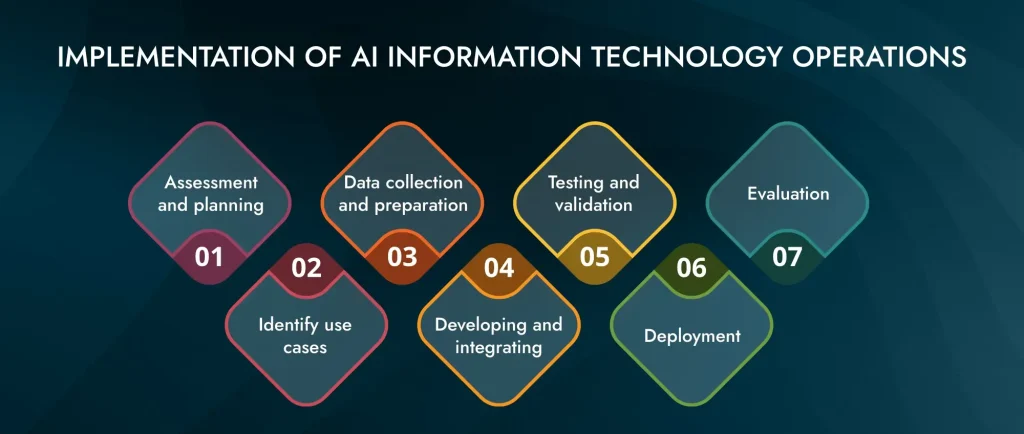
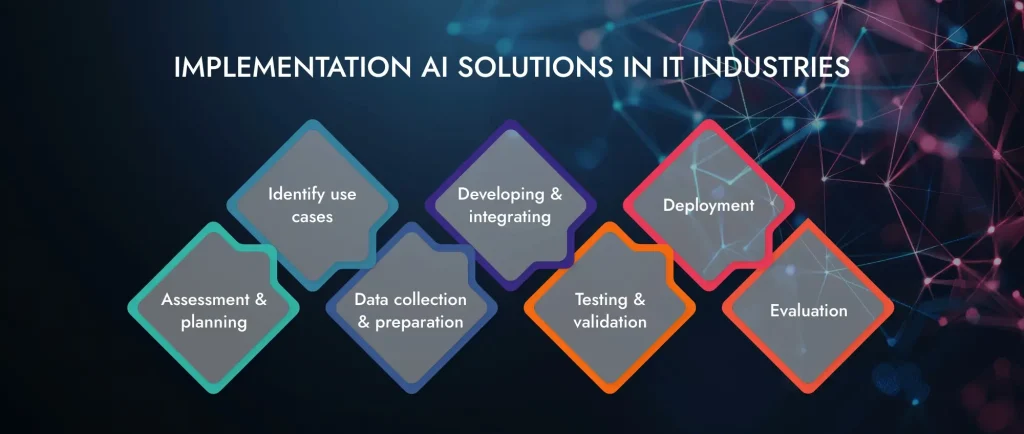
Let’s understand the process of implementing AI use cases in IT operations:

Implementation of AI Information Technology Operations

Clearly defining the objective of the business helps implement AI in IT operations. The objectives include improving efficiency, providing security, or optimizing the allocation of resources. Also, evaluating the current IT infrastructure, such as existing technologies, team skill sets, and data quality, is essential to identify the readiness for AI integration.

It is necessary to identify use cases such as automated monitoring, predictive maintenance, or detection of security threats. When use cases are identified, IT teams can solve the specific problem in the business and help assess the feasibility of implementing AI. Additionally, identifying use cases helps identify challenges and risks for AI implementation. The risks include data privacy, regular compliance, security, and ethical considerations.

Data collection is important for businesses to analyze. The data includes historical data, performance metrics, and other data sources. Also, quality and reliable data are essential for the company to analyze.

Collaborate with data scientists and IT professionals to develop and train AI models. Also, AI should be integrated with existing systems to improve workflow, ensure compatibility, and minimize distribution for ongoing operations.

Once the AI model is developed, it is essential to test and validate it. For the testing, create a controlled environment where AI models can be tested. Feedback will also be received based on testing. Performance analysis is possible during the testing phase, and improvement will occur in the AI model.

Once the AI model in IT is tested and validated, implement it on a smaller scale or in a specific department without expanding into a broader operation. After implementing it on a smaller scale, monitor the tools to track the performance of systems and provide support for the operations.

The last is to evaluate the AI model. In this step, the performance of AI models is assessed regularly with the defined objectives and key performance indicators ( KPI). After evaluation, improve and optimize the system based on performance feedback and operation changes as per requirements.

These are 7 steps to implementing AI information technology use cases in the IT industry.

SEE: Cost Optimization in IT with Artificial Intelligence

Harness AI Use Cases in Information Technology to Elevate Your Business

How Can Viitorcloud Help IT Industries with AI?

In the developing IT sector, staying ahead of the curve requires more than just adapting to changes—it means leading the charge with innovative solutions. That’s where ViitorCloud comes in, offering tailored AI solutions designed to elevate your IT business to new heights.

From automating routine tasks to enhancing software testing and optimizing IT support, AI transforms the way businesses operate. But beyond the technical advantages, the real power of AI lies in its ability to empower decision-makers, streamline operations, and drive growth.

At ViitorCloud, we don’t just provide AI development services—we partner with you to unlock the full potential of AI use cases in information technology. Our team of AI experts listens to your unique challenges, understands your vision, and crafts bespoke AI strategies that align with your business goals. We’re not just here to implement AI; we’re here to transform your business, making it more efficient, more competitive, and more successful.

When you’re ready to take your IT business to the next level, ViitorCloud is ready to make it happen. With our expertise and commitment to excellence, you can trust us to deliver AI solutions that work for you. So don’t wait—reach out to ViitorCloud today, and let’s start building the future of your IT business together.


Frequently Asked Questions

The impact of AI on information technology is to streamline the IT operation process, enhance decision-making, and improve efficiency in data management. Also, it helps to reshape the future of the IT industry.

AI used in information technology are automating technical tasks, assisting in IT management, and helping in IT documentation. Additionally, AI helps in software testing, automated code review, data backup and recovery, cloud computing, and resource allocations.

AI is an example of natural language processing used in information technology as it helps interact with the customers, provides customer support, and automates the responses. It enhances the user experience and improves efficiency in real time.

Top 5 Azure Cognitive Services for Building Intelligent Apps

Azure Cognitive Services is a suite of AI tools provided by Microsoft. It is designed to help developers create intelligent applications with minimal effort. Azure services offer pre-built APIs that can handle complex tasks such as language understanding, vision recognition, speech processing, and decision-making. It allows developers to integrate powerful AI capabilities in their applications without the need for deep AI expertise. According to Microsoft, over 1 million developers already used Azure Cognitive Services which makes it a trusted choice for businesses worldwide.

Azure Cognitive Services: An Overview

What is Azure Cognitive Services?

Azure Cognitive Services is a collection of AI tools and APIs provided by Microsoft. It allows developers to integrate intelligent features into their applications. Azure Services covers a wide range of functionalities which includes computer vision, natural language processing, and speech recognition. The core purpose of Microsoft Cognitive Services is to simplify the implementation of advanced AI capabilities. It makes it easy for businesses to create applications that can understand, interpret, and respond to human input meaningfully.

Core Purpose and Functions

Azure Cognitive Services offer pre-built models and algorithms that perform tasks such as:

  • Computer Vision: It analyzes and interprets visual data such as identifying objects, reading text, and recognizing faces in images.
  • Natural Language Processing (NLP): It understands and generates human language, allowing features like sentiment analysis, language translation, and text extraction.
  • Speech Recognition: It can convert spoken language into text and understand spoken commands that support voice-controlled applications.
  • Decision Making: It provides insights and recommendations based on data, such as anomaly detection and personalized recommendations.

Key Benefits of Azure Cognitive Services

  1. Enhanced Application Intelligence: Azure Cognitive Services allows developers to create smarter applications that can analyze and respond to user input with greater accuracy. This results in more interactive and engaging user experiences.
  2. Faster Time-to-Market: Pre-built models and APIs allow developers to speed up the development process which eliminates the need to build and train custom AI models. This helps bring products to the market faster.
  3. Cost Efficiency: Integrating these services can be more cost-effective compared to developing AI capabilities in-house. Azure’s scalable solutions allow businesses to pay only for what they use, reducing overall costs.
  4. Ease of Integration: Azure Cognitive Services are designed to be easily integrated into existing applications through simple APIs. This easy integration allows businesses with limited AI expertise to use advanced AI features.
  5. Scalability and Reliability: As part of Microsoft Azure Cognitive Services, these services benefit from the cloud platform’s scalability and reliability. Applications can handle varying workloads and stay operational with minimal maintenance.

Implement intelligent solutions that transform your business. Explore how ViitorCloud helps you harness Azure Cognitive Services for building intelligent apps today.

Top 5 Azure Cognitive Services

Azure Cognitive Services is a collection of cloud-based APIs that allow developers to easily add intelligent capabilities to their applications. Let’s explore the top 5 Microsoft Azure Cognitive Services that can help you to build powerful intelligent apps.

1. Vision

The Microsoft Azure Computer Vision in Cognitive Services allows your apps to interpret and understand visual data.

Key services include:

  • Computer Vision: Analyze images to identify objects, detect faces, and read text.
  • Face API: Detects, recognizes, and analyzes human faces in images.
  • Video Indexer: Extract insights like keywords, labels, and transcripts from videos.

2. Speech

The Azure Speech services allow your apps to recognize, synthesize, and translate speech in real time.

Services include:

  • Speech to Text: Transcribes audio to text in over 80 languages.
  • Text to Speech: Converts text to human-like speech in many languages.
  • Speech Translation: Translates speech to text in multiple languages.

3. Language

The Language services allow your apps to understand and respond to human language.

Key services are:

  • Language Understanding (LUIS): Adds language understanding to apps.
  • Text Analytics: Extracts insights like sentiment, key phrases, and language from text.
  • Translator Text: Translates text across 70+ languages.

4. Knowledge

The Knowledge services help you build knowledge-based apps and services:

  • QnA Maker: Creates a conversational question-and-answer layer over your data.
  • Content Moderator: Moderates text, images, and videos for adult or offensive content.
  • Academic Knowledge: Provides an API to the Microsoft Academic Graph.

5. Decision

The Decision services allow your apps to make intelligent choices:

  • Personalizer: Optimizes content and experiences based on user preferences.
  • Anomaly Detector: Detects anomalies in time series data.
  • Metrics Advisor: Monitors and diagnoses issues in time series data.

Azure Cognitive Services simplifies adding state-of-the-art AI capabilities to your applications with minimal code. These services enable you to build intelligent apps that can see, hear, speak, understand, and make decisions.

Enhance user experiences and drive innovation. Let ViitorCloud guide you in leveraging Azure Cognitive Services for building intelligent apps.

Azure Cognitive Services Use Cases

Azure Cognitive Services offers a wide range of functionalities that can be applied across various industries and applications. Let’s explore some detailed use cases showing how organizations use these services to enhance their operations and improve customer experiences.

1. Healthcare

  • Medical Imaging Analysis: Azure’s Computer Vision can analyze medical images to assist in diagnosing conditions. For instance, it can identify tumors in X-rays or MRIs, helping radiologists make quicker and more accurate decisions.
  • Speech Recognition for Patient Interaction: Speech-to-text services can transcribe doctor-patient conversations, allowing healthcare providers to focus on patient care rather than note-taking. This can also facilitate better documentation and compliance.

2. Retail and eCommerce

  • Personalized Shopping Experiences: Retailers can use the Personalizer service to recommend products based on user behavior and preferences, enhancing customer engagement and increasing sales.
  • Visual Search: Integrating the Computer Vision API enables eCommerce platforms to support image uploads for products customers want to buy, providing visual search capabilities that match the uploaded image with the available inventory.

3. Finance

  • Fraud Detection: Financial institutions can utilize anomaly detection services to monitor transactions in real time, identifying suspicious activities that may indicate fraud.
  • Customer Support Automation: Chatbots powered by Language Understanding (LUIS) can handle customer inquiries, providing instant responses to common questions and freeing up human agents for more complex issues.

4. Education

  • Interactive Learning Tools: Educational apps use Speech services to convert text to speech, making learning materials more accessible to students with visual impairments or reading difficulties.
  • Sentiment Analysis for Feedback: Text Analytics can be employed to analyze student feedback, allowing educators to gauge sentiment and improve course offerings based on student experiences.

5. Manufacturing

  • Predictive Maintenance: Analyzing sensor data with Decision services helps manufacturers predict equipment failures before they occur, reducing downtime and maintenance costs.
  • Quality Control: Computer Vision identifies defects in products on production lines, maintaining quality control and meeting standards.

6. Smart Cities

  • Traffic Management: Azure Cognitive Services can analyze video feeds from traffic cameras to monitor congestion and optimize traffic light patterns in real time, improving urban mobility.
  • Public Safety: Facial recognition capabilities can enhance security in public spaces by identifying persons of interest or tracking missing individuals.

7. Agriculture

  • Crop Monitoring: Farmers can use Computer Vision to analyze drone imagery of their fields, identifying areas that require attention, such as pest infestations or water shortages.
  • Yield Prediction: Machine learning models can be trained using historical data to predict crop yields, helping farmers make informed decisions about planting and harvesting.

8. Media and Entertainment

  • Content Moderation: Media platforms can utilize the Content Moderator service to automatically filter out inappropriate content, ensuring a safe environment for users.
  • Automatic Subtitling and Translation: Speech services can be used to generate subtitles for videos in multiple languages, making content accessible to a broader audience.

9. Travel and Hospitality

  • Real-time Translation: Travel apps can integrate Translator Text to provide real-time translation of menus, signs, and other materials, enhancing the travel experience for international visitors.
  • Personalized Recommendations: Personalizer helps travel platforms suggest personalized itineraries based on user preferences and past behavior, improving customer satisfaction.

10. Human Resources

  • Resume Screening: Text Analytics can help HR departments analyze resumes and identify the best candidates based on specific criteria, streamlining the recruitment process.
  • Employee Sentiment Analysis: Organizations can use sentiment analysis to gauge employee satisfaction through feedback surveys, helping to address issues proactively.

Integrate advanced AI capabilities into your business apps effortlessly. Partner with ViitorCloud to implement Azure Cognitive Services for building intelligent apps.

Success Stories of Companies Using Azure Cognitive Services

Numerous organizations across various industries have successfully implemented Azure Cognitive Services to enhance their operations, improve customer engagement, and drive innovation.

Let’s explore some notable success stories:

Spotify utilized Azure’s Speech Service to enhance its Soundtrap for Storytellers application. This integration allows content creators to auto-transcribe their audio tracks, streamlining the podcast editing process by enabling editing directly within the transcribed document.

Airbus uses Azure Cognitive Services, specifically the Anomaly Detector, to provide predictive maintenance for its mixed aircraft fleets. This approach helps the company address aircraft maintenance challenges more efficiently, improving operational reliability.

In the insurance sector, Nationwide developed a bot named NOVA using Azure Bot Service. This bot handles approximately 25,000 interactions monthly, assisting customers with loss claims, frequently asked questions, and password resets, which allows call center agents to focus on more complex inquiries.

Caesars Entertainment employs Azure Bot Service to deploy a text message bot that answers customer inquiries. This implementation has improved customer service efficiency across its various brands, including Harrah’s and Horseshoe.

This Canadian automotive marketplace uses Azure Cognitive Search to improve its search capabilities, launching a dealer-to-dealer auction site. The service enhances the search experience for consumers and provides better services across devices.

The Atlantic has adopted Azure Cognitive Search to digitize and catalog its 160 years of published history. This transition allows for public exploration of its archives and provides a resource for writers to connect stories and enrich their content.

Lexmark uses Azure Machine Learning to analyze data from millions of IoT-enabled printers, facilitating predictive diagnostics and improving business decision-making processes.

Schneider Electric uses Azure Machine Learning to significantly reduce the time needed to identify appropriate predictive maintenance models from one month to just one day, enhancing operational efficiency and safety.

Stay ahead in the digital age by implementing intelligent features. ViitorCloud helps you utilize Azure Cognitive Services for building intelligent apps.

Conclusion

Azure Cognitive Services provides powerful AI capabilities that transform businesses across industries. These AI-driven solutions enhance customer experiences through personalized recommendations and improve operational efficiency with predictive maintenance. Organizations use these intelligent tools to innovate faster and smarter, without needing deep AI expertise, thanks to Microsoft’s scalable, pre-built APIs.

Enhance your business with advanced AI today. ViitorCloud Technologies helps bring Azure Cognitive Services into your applications. Reach out to ViitorCloud and start improving your business with smart AI solutions!

Frequently Asked Questions

To leverage each service effectively, understand the specific capabilities of each API, integrate them into your applications based on your business needs, and continuously monitor their performance for optimization.

Industries such as healthcare, finance, retail, education, and manufacturing can greatly benefit from the capabilities of Azure Cognitive Services to enhance their operations and customer experiences.

The cost varies based on the specific services used and the volume of requests. Azure offers a pay-as-you-go model, allowing you to only pay for what you use after the free trial.

Maximize utilization by combining multiple services for enhanced functionalities, regularly updating your applications, and utilizing Azure’s monitoring tools to analyze usage patterns and optimize performance.

ViitorCloud Technologies offers expert guidance in integrating Microsoft Azure Cognitive Services into your applications, ensuring optimal setup, customization, and ongoing support specified to your business needs.

How AI is Helping IT Companies to Improve Efficiency and Reduce Costs

In today’s fiercely competitive landscape, adopting cutting-edge technology is no longer optional—it’s essential. ViitorCloud is here to help your business achieve unparalleled efficiency and significant cost savings through Cost Optimization in IT with Artificial Intelligence.

AI is at the forefront of this transformation, offering powerful tools to enhance your operational effectiveness while slashing expenses. With ViitorCloud’s AI Development Services, we harness the potential of Machine Learning (ML), Natural Language Processing (NLP), and Intelligent Process Automation (IPA) to drive your business forward.

Our tailored AI Solutions empower you to automate critical activities, improve decision-making, and streamline operations, resulting in remarkable cost savings. Choose ViitorCloud to navigate this technological revolution and achieve your Information Technology business goals.

The Role of Artificial Intelligence in Information Technology

Artificial Intelligence has brought exceptional efficacy and innovation in the information technology sector.

Let’s check out how cost optimization in IT with Artificial Intelligence operates:

The Role of Artificial Intelligence in Information Technology

1. IT Operations

By analyzing real-time data from various sources, AI optimizes system reliability, performance in IT operations, and resource allocation. It forecasts issues, automatically allocates resources, and identifies optimization opportunities across on-premises and cloud environments.

By automating routine tasks AI minimizes downtime and reduces operational expenses.

2. Automated Code Review

Automated code review tools using artificial intelligence examine software codebase, identifying possible bugs, security vulnerabilities, or deviations from coding standards.

This proactive approach improves software development quality by dealing with potential risks early, resulting in a more secure, reliable, and maintainable codebase.

Through swift feedback provision showing areas for enhancement, AI-driven code review tools expedite the software development life cycle.

3. Capacity Planning

AI algorithms play a crucial role in capacity planning by analyzing historical data or usage patterns that forecast future resource requirements. This capability enables IT professionals to strategically plan their infrastructure upgrades to ensure the optimal allocation of resources required for present and future needs.

These algorithms help organizations identify potential performance bottlenecks allowing companies to address possible issues before they affect operations proactively.

4. Cybersecurity and Threat detection

Artificial intelligence has significantly improved cybersecurity and threat detection, boosting organizational resilience against cyber risks.

The AI in the cybersecurity market is projected to grow from approximately 24 billion U.S. dollars in 2023 to about 134 billion U.S. dollars in 2030. AI monitors anomalies or suspicious activities that might indicate security breaches by analyzing network traffic, system logs, and user behavior.

In the real-time analysis of large volumes of data; AI-driven systems can detect emerging threats, malware, or intrusion attempts which could otherwise go undetected by traditional security measures. Once a possible threat is detected, AI can send alerts, automate incident response actions, isolate affected devices, or block malicious activities. This proactive approach significantly strengthens an organization’s cybersecurity posture by mitigating risks, reducing response times, and safeguarding sensitive data and resources from cyberattacks.

5. Automated Report Generation

The avant-garde AI IT Operations dominate in automating report generation to ensure accuracy and consistency in performance and compliance documentation.

It also enables efficient processing of large data sets thereby minimizing errors, elevating reliability, and facilitating strategic decision making. IT professionals can concentrate on essential tasks while strengthening operational efficiency and compliance standards.

6. Network Optimization & Performance Monitor

In achieving optimization in network performance and technology monitoring, artificial intelligence is essential. Network traffic pattern analysis by AI-driven algorithms helps to detect anomalies and predict potential bottlenecks before they interfere with operations.

This proactive approach ensures better network efficiency and reliability for smooth business operations and user experience.

7. Helpdesk Automation

Through automated ticketing, issue resolution, user query handling using chatbots, and virtual assistants, help desk automation powered by AI changes IT support processes.

In their responses to the user questions, these algorithms rely on this AI support to solve generic questions and forward complex issues to human agents efficiently. Consequently, support operations are streamlined through this automation, reducing response times and enhancing customer satisfaction.

8. Business Intelligence & IT Documentation

In business intelligence (BI), AI improves data analytics capabilities by pulling insights from large datasets, generating actionable reports, and analyzing trends visually.

AI-driven BI tools automate the report generation process, which can also predict market movements based on historical and real-time analysis to identify opportunities for expanding businesses.

Moreover, it automates IT documentation tasks such as sorting out information into categories or indexing them, ensuring that IT professionals make it available whenever needed.

READ: AI in Information Technology: Transform IT Services with AI

Optimize IT Costs with AI Solutions

Discover how AI can streamline your IT operations and cut costs. Start your AI journey with ViitorCloud today.

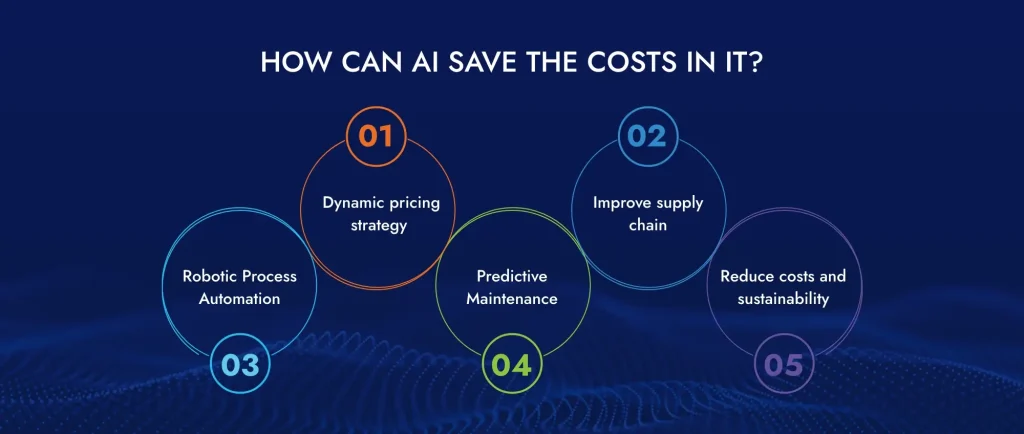
How Can AI Save the Costs in Information Technology?

Optimize your business and maximize efficiency with ViitorCloud’s AI development services. AI not only saves valuable time for you and your team, but it also drives significant advantages across various industries. With our tailored AI solutions, we help you achieve cost optimization in IT, allowing your business to thrive in today’s competitive landscape.

Let us explain how artificial intelligence contributes significantly to cost-cutting:

AI Can Save the Costs in Information Technology

By employing ML models businesses can fine-tune prices dynamically to maximize revenue while remaining competitive thanks to AI-powered pricing algorithms that offer dynamic pricing strategies based on real-time market conditions, customer behavior, and competitor analysis.

Moreover, these algorithms detect price gouging or leakage, thereby improving profitability because they can also identify pricing anomalies. Most importantly, retailing will change remarkably.

Use AI to predict the amount of demand, improve supply chain and efficient inventory management, and reduce downtime through predictive maintenance.

Failure patterns are analyzed by AI algorithms using historical data and sensor readings that enable proactive maintenance scheduling thereby extending asset lifespan and lowering operating costs. Gartner estimates that by 2025, as many as 80% of customer service organizations in the retail sector will rely on generative AI for personalized experiences.

Use AI to forecast demand, improve supply chain efficiency, manage inventory, and reduce downtime through predictive maintenance.

Cost savings can be achieved by employing AI to automate tasks utilizing artificial intelligence-based solutions such as Robotic Process Automation (RPA). This helps to streamline workflows so that repetitive, rule-based activities like data entry, invoice processing, and customer support can be managed.

Manual intervention is removed, reducing errors and faster task completion, allowing employees to focus on high-value work. A good example is students purchasing their photos online rather than having them taken manually.

AI-driven predictive maintenance allows businesses to anticipate equipment failures before they occur, thus avoiding costly downtimes or unscheduled maintenance. With the help of AI algorithms that analyze historical data, sensor readings, and other relevant factors, this enables the identification of patterns indicating potential failure points.

This proactive approach enables planned maintenance, thereby reducing operational costs due to the extended life span of critical assets or optimal maintenance schedule.

Artificial intelligence-based management systems optimize energy consumption rates based on historical data like weather patterns and building occupancy levels.

Thus, companies can reduce expenses while improving their operations and increasing their carbon footprint. Among other things, these solutions provide options for conserving energy, including resetting HVAC settings or making a better schedule for your machinery, leading to substantial cost savings while promoting sustainable development.

ALSO READ: Benefits of AI in Information Technology for Startups

Maximize IT Savings with Artificial Intelligence

Implement AI to achieve cost optimization in IT. Let ViitorCloud help you reduce costs and boost efficiency.

How Can AI Improve Efficiency in Information Technology?

Leverage ViitorCloud’s AI solutions to optimize your IT operations and unlock their complete potential. Imagine transforming routine tasks into automated processes, optimizing costs, and boosting productivity—all with the power of artificial intelligence. Our AI development services are designed to enhance communication, streamline collaboration, and drive real results for your business.

Here we are explaining how artificial intelligence can improve efficiency in information technology:

AI Improves Efficiency in Information Technology

Automation and time-saving technologies are at the forefront of AI’s capabilities in improving IT efficiency. By leveraging AI-powered automation, organizations can streamline repetitive tasks such as data entry, system monitoring, and routine maintenance.

Robotic Process Automation (RPA) which is an application of AI carries out this process much quicker than humans whilst being more accurate thereby releasing a lot of human resources to do more strategic jobs. This means fewer mistakes will be made leading to shorter processes hence it saves so much time making employees highly productive.

Through enhancing communication and collaboration tools AI has made it easier for IT departments to work with each other no matter where they are located. Smarter features like real-time translation, automatic meeting scheduling, or advanced search capabilities have been incorporated into platforms like Microsoft Teams, Slack, or Google Workspace thanks to AI technology.

These tools analyze communication patterns and suggest optimal ways to connect with team members, ensuring that everyone is on the same page and collaborators get their things done faster through such ways. It also helps greatly when used repetitively so that it would facilitate collaborative efforts as well as make these teams understand one another. Otherwise, AI can be used to automate such communication tasks as sending reminders or summarizing meeting notes, thus making team members more productive.

IT services are so tailor-made by AI that the needs of users and organizations are met. Some machine learning algorithms enable AI to analyze user behavior and preferences, which will help in customizing content delivery, recommendations, and support.

For instance, the UI of software applications can be changed by AI based on personal usage patterns; this helps improve overall satisfaction levels among users. This implies that it adopts a dynamic approach following real-time data for IT management solutions and strategies that boost performance while increasing resource allocation.

This one characteristic of AI is its ability to serve throughout. In practical terms, it means that since AI systems do not have bodily fatigue, they can be working at any time with support and monitoring being available constantly. This feature is especially useful in IT departments that require high availability and uptime.

In addition, these tools monitor events as they occur versus after their occurrence has escalated into significant disruptions. Moreover, AI-powered chatbots or virtual assistants are always there to assist customers leading to immediate interactions with auto-decision-making.

It delivers faster, more accurate, and better personalized assistance than traditional customer support methods. To facilitate this ability, NLP (natural language processing) technology in AI-enabled chatbots allows them to respond to questions ranging from those related to troubleshooting technical problems up to frequently asked queries by customers.

Future predictions benefit from prior engagements plus other valuable customer details while customized support services rely on such feedback. By automating simple tasks associated with answering clients’ questions human operators become available for handling complex issues hence improving efficiency at all levels of production for customer satisfaction.

SEE: Top 5 Applications of AI in Information Technology

Transform IT Efficiency with AI-Driven Cost Optimization

Reduce operational costs and improve performance with AI. Partner with ViitorCloud for customized AI development.

Boost Your IT Business with ViitorCloud’s AI-powered Solutions

In today’s fast-paced IT landscape, achieving cost optimization with artificial intelligence is no longer just an option—it’s a necessity. ViitorCloud’s AI Development Services are designed to help your business enhance productivity, cut costs, and stay ahead of the competition.

Our expert-driven AI solutions empower your company to automate routine tasks, improve performance, and predict potential challenges before they become costly problems. Whether you’re looking to streamline operations or implement advanced predictive maintenance systems, ViitorCloud has the perfect solution tailored to your needs.

With ViitorCloud’s AI-powered strategies, your firm can unlock the true potential of cost-effective information technology. Our AI Solutions are not just about adopting AI but about integrating it seamlessly into your business processes, ensuring that your company remains efficient, competitive, and profitable.

No matter where your IT firm stands on the technological spectrum, ViitorCloud will help you harness the power of AI to optimize costs and drive your business forward. Choose ViitorCloud’s AI Solutions to transform your operations and achieve your business goals today.


Frequently Asked Questions

AI reduces IT costs by doing the following: automating repetitive tasks, reducing human error, improving predictive maintenance, and optimizing resource allocation. As a result, operational expenses are cut down, and downtime decreases, making it easier to use IT infrastructure effectively.

It optimizes them through streamlining operations, automating repetitive functions, strengthening cybersecurity measures, and using advanced data analytics. This leads to improved decision-making, enhanced resource planning, increased productivity, and a more adaptive and flexible IT environment.

It improves efficiency through the automation of processes, real-time data analysis, prediction and prevention of potential problems, and optimized management of resources. This leads to quick problem-solving, better-performing system performance, and more efficient IT operations.

Top 5 AI Applications Transforming Information Technology

Information technology has problems such as data breaches, cybersecurity threats, issues between software and hardware systems, system downtime, and inefficient IT infrastructures. Due to this problem, inefficiency has arisen in the IT industry.

Applications of AI in information technology help solve all the problems with automation, data security, personalized user experience, software development, and image and visual analytics. Additionally, the operation process optimizes, and IT operations efficiency and productivity improve.

Let’s dive into the details of AI in information technology applications and how Artificial Intelligence potentially reduces costs in the information technology industry.

Artificial Intelligence Applications in Information Technology

According to the statistics, the AI market will reach $190 billion by 2025. Many applications of AI solve issues in different industries. Applications of AI in information technology help solve IT industry problems with applications such as automation, data security, software development, and more.

Let’s study the applications in detail.

Top 5 Applications of AI in Information Technology

1. Automated the Operations

IT operations are an essential concept in the IT industry, and they are used to manage system performance, deploy new services or products, improve security, and reduce downtime. IT Operations Automation is a technology process that automates IT operations and management. It helps in enhancing productivity and reduces costs by automating manual tasks. Also, AI helps increase effectiveness, responding quickly to issues and increasing the reliability of IT infrastructure.

2. Provide Data Security

Data security is one of the most important assets of the information technology industry. It helps keep customers’ confidential data and company secrets. Data security is important legally and operation-wise. AI helps data security by identifying unknown threats, which can create severe network damage. Additionally, it helps identify cyberattack faults and threat prevention and detects unusual behavior that develops viruses or malware in the systems. This is how Data security Applications of AI in information technology are useful.

3. Helps in Software Development

AI can analyze vast amounts of software-related data and recommend upgrades and enhancements for machine learning. This helps software developers keep the software system upgraded and improves its quality. Additionally, AI automates various software programmers’ tasks, one of which is to automate software developer tasks. The task of generating code and testing is automated. This is the way software development Applications of AI in information technology is useful.

4. Personalized and User Experience

An AI software application helps deliver a personalized user experience. AI analyzes the data to understand behavior patterns and provide recommendations to a user. Also, AI tailors content for the user and interacts with individuals to meet user preferences. This type of personalization improves engagement and satisfaction and creates long-term relationships.

5. Image and Video Analysis

Computer vision combines machine learning, computer science, and image processing to develop systems that interpret and analyze visual data. It helps enhance security with biometric authentication systems. It streamlines the process in the IT industry and automates repetitive visual tasks, which improves efficiency.

These all are the AI in information technology examples of applications that help in improving productivity in the IT industry.

READ: AI in Information Technology: Transform IT Services with AI

Innovation with AI in IT

Ready to implement AI solutions in your Information Technology processes? Partner with ViitorCloud for cutting-edge development.

Potential for AI to Reduce Development Costs

AI is useful in reducing the cost of operations and helps employees focus on important tasks as it automates manual work. Let’s understand AI in information technology applications which reduce development costs.

Potential for AI to Reduce Development Costs

AI can automate software developers’ tasks, which improves their efficiency and productivity. The task is generating code snippets, testing, and data labeling. It saves time and helps in focusing on critical tasks.

AI tools such as code generators and auto plugins can increase the code generation speed. Natural Language Processing helps convert specifications into code snippets that reduce manual coding efforts and errors. As a result, a developer can focus on problem-solving tasks and streamlining the development process.

AI plays an important role in software testing. AI testing tools automatically generate, execute, and analyze test results. As a result, test coverage improves, and the accuracy of test outcomes improves.

Data labeling provides annotated datasets such as images, videos, and text that train algorithms to perform tasks automatically. It ensures accuracy and data relevance to enhance model performance in natural language processing, predictive analytics, and image recognition applications. This data labeling helps perform tasks from automated customer services to complex data analytics.

Optimization in the IT industry is improving various aspects of operations, efficiency, and decision-making, which leads to reduced costs. Let’s understand in detail.

AI optimizes allocating resources such as storage, cloud instances, and processing power based on performance and workload demands. It ensures efficient resource use, which cuts down unnecessary costs.

AI identifies inefficiency in IT operations and workflows, then optimizes workflows and automates repetitive tasks to streamline operations and improve productivity.

AI analytics provide insights into IT operations, user behaviors, and performance metrics. These insights help make informed business decisions regarding software investment, resource allocation, and IT strategy, decreasing the cost in the IT industry. Also, it helps in predictive maintenance and risk assessment such as follows:

AI has a large amount of data, which helps predict hardware failures and system issues before they occur. This approach prevents costly downtime and emergency repairs that reduce maintenance costs.

AI in IT helps identify vulnerabilities and threats and mitigate the risk of threats on the system. Additionally, AI analyzes vast amounts of data to detect anomalies and patterns and take proactive measures to protect systems, data, and operations. It is a way for decision-making to improve in the IT industry.

Minimizing errors in IT operations not only saves time but also reduces overall operational costs. Ensuring that systems and processes are error-free helps organizations improve productivity and operational efficiency. Additionally, reducing errors can lead to better user experiences, increased customer satisfaction, and a more reliable IT infrastructure. Therefore, investing in error-reduction strategies can yield significant long-term benefits for businesses.

AI helps identify fewer bugs through automated testing and data validation techniques. Also, it helps analyze code, predict issues, and monitor system behavior in real time. As a result, early detection and error reduction improve software quality in Information technology.

To improve quality, AI rigorous data validation, robust model training, and monitoring continuously. Also, it implements AI models, regularly updates AI models, and ensures reliability and transparency.

These all are the AI in information technology examples which help reduce IT industry costs.

ALSO READ: Benefits of AI in Information Technology for Startups

Elevate Your IT with AI Expertise

Enhance your IT capabilities with our tailored AI services. Let’s make your Information Technology smarter.

How Can Viitorcloud Help Your It Challenges with an AI Solution?

Innovations in the application of AI in information technology help solve problems in the Information Technology industry. AI can analyze large amounts of software-related data to update the software system and predict its failure. Also, it provides a personalized user experience by analyzing the behavior patterns and user behavior.

We, Viitorcloud, an AI development service company, integrate AI into information technology to improve efficiency in the operations and workflow process. AI also optimizes resource allocation and helps improve decision-making. As a result, cost is reduced. Our expert team provides impactful AI solutions to improve efficiency and productivity.

If you are looking for someone to help you with IT challenges with an AI solution, do not look further. Contact us today and integrate AI solutions into information technology to solve the problems in your IT business.

Frequently Asked Questions

The perspectives of AI in information technology examples are the automation of repetitive tasks, the help in decision-making, and the prediction of trends and behavior in data patterns. Also, it detects and responds to cyberattacks.

AI is used in information technology to detect threats, provide IT support, predict maintenance, and optimize the network. Also, AI helps in IT documentation, cloud computing, and resource allocations. The use of AI improves efficiency in operations and the IT industry.

The AI in information technology applications includes data security, IT operation automation, software development, image and video analysis, and personalized user experience. It helps in improving efficiency and productivity.

Information technology AI solutions include automating operations, detecting and responding to threats, and analyzing the data for insights. Also, it provides personalized customer experiences to increase efficiency and reduce costs.

How Can AI Be Beneficial to Information Technology Startups?

Between endless opportunities and persistent competition, many young technology companies are standing in a critical position. What’s the best way for them to make themselves unique from other competitors who are also after the same market? How can they stay strong in the face of changing challenges? The most important question is how these entities can encourage innovation and growth.

Start-up owners may find themselves faced with the challenging task of maneuvering through resource constraints, market competition, scaling hurdles as well as regulatory challenges. Nevertheless, artificial intelligence (AI) provides a solution that is powerful enough for them to confidently confront these challenges. This article discusses the benefits of AI in information technology.

Why Does AI in Information Technology Matter?

For quite some time now, artificial intelligence has been around. The advent of AI has radically shifted how repetitive tasks are handled within the IT industry. Robotic Process Automation (RPA) allows for the automation of ordinary and repetitive tasks so that valuable human resources are freed up to focus on more strategic and creative activities that enhance efficiency while significantly reducing chances for errors.

Chatbots and voice-activated systems like AI-powered virtual assistants have revolutionized customer service in the IT industry. AI matters immensely in information technology because it drives efficiency, enhances decision-making, improves customer service, and promotes cybersecurity.

7 Benefits of Integrating AI in your IT Industry

Artificial intelligence is revolutionizing the industry through task automation. This shift increases efficiency and empowers IT experts to dedicate more time to innovation and strategic development.

Here are some of the benefits of AI in information technology:

7 Benefits of AI in Information Technology

1. IT Support and Helpdesk Automation

IT support and helpdesk automation revolutionize user assistance and issue resolution. A user who experiences a technical problem can go to a self-service website or chatbot for a support request. The system automatically categorizes and prioritizes the problem based on its severity and nature.

Automated responses provide immediate solutions for common issues, reducing resolution times significantly. If humans must intervene to address a problem, the ticket will be redirected by the system to the appropriate IT staff member, leading to a quick but accurate response.

Generally, this automation improves overall service efficiency and helps IT professionals deal with complex tasks while being responsive, thus making the IT support ecosystem user-friendly.

2. Data Analytics & Business Intelligence

The applications of artificial intelligence (AI) have transformed data analytics as well as business intelligence. AI-driven algorithms enable organizations to extract valuable insights from large volumes of complex data sets, thereby discovering trends, patterns, and correlations that might otherwise remain hidden.

These insights facilitate data-driven decision-making across various business functions. Market changes, customer behaviors, operational needs, etc can all be predicted by AI-powered predictive analytics, hence helping businesses anticipate future trends. Also, different types of prescriptive analytics provide business teams with recommendations for optimizing their work and improving production effectiveness.

AI in business intelligence can visualize data, automate report creation, and extract more meaning from historical data. With AI’s natural language processing (NLP), users can ask questions about data as though they were speaking to another person – making it easier for non-technical audiences to access the data.

READ: Data Analytics Consulting Helps Small Businesses to Grow

3. Software Development

AI for IT startups has simplified writing software programs by automatically generating code instead of manually performing this task. The computer algorithms used in AI analyze code patterns, allowing them to create mini codes, thus reducing the time spent designing routine program tasks.

This shortens the development cycles, enabling programmers to shift their attention to more difficult and creative aspects of code writing. This AI-powered code writing also helps to maintain a consistent coding standard at all times throughout the codebase. It is important to note that such an application of AI will improve productivity while reducing errors and enabling software developers to produce high-quality code faster.

4. IT Asset & Documentation Management

Augmented by artificial intelligence (AI), IT asset management is crucial for effectively managing and optimizing the IT resources of an organization. This includes tracking and controlling IT assets through their whole lifecycle, such as hardware, software, and licenses.

Artificial intelligence automates the detection process of assets, keeps track of usage trends, and forecasts when fixes or replacements are necessary for them. In so doing, IT professionals have accurate stock records, thus minimizing chances of under-utilization or unwarranted expenditures, which translates into significant savings.

5. Chatbots

Immediate answers from AI-driven chatbots are changing the face of information technology support. Hence, these chatbots can understand users’ requests with NLP (natural language processing) without wasting time on troubleshooting problems but instead see how quickly they can fix them.

So this speeds up support processes significantly, reducing response times substantially and leading to a good user experience. Thus, chatbots care for common inquiries while freeing human agents from mundane tasks, improving overall support performance.

According to Forbes Advisor, ChatGPT was the most talked about innovation in Artificial Intelligence during the 2022 fall season; within five days after its launch in November 2022, it attracted over one million users. Based on several reports, it has increased productivity by 14% among tech companies’ staff through AI applications, confirming the readiness of IT to incorporate AI.

With their ability to learn iteratively, they gain effectiveness as they evolve and adapt better to users’ changing needs, enhancing the quality of IT support services. As a result, it provides fast and accurate technical assistance thus leading to high customer satisfaction rates thereby making an IT infrastructure more flexible and agile.

6. Procurement and Vendor Management

AI in information technology procurement and vendor management uses artificial intelligence to improve the acquisition of AI development services and IT products from external suppliers. Organizations need to leverage data when selecting vendors, optimizing contract terms and pricing, tracking costs, assessing the performance of vendors, and managing the risks involved.

Automating routine activities while providing actionable insights based on service level agreements (SLAs) and contractual terms are ways that AI helps organizations reduce costs while increasing efficiency with strong vendor relationships.

7. Cloud Computing and Resource Allocation

This enables faster cloud computing optimization by applying AI approaches to resource allocation in cloud infrastructure, enhancing how efficiently this can be done at a low cost. For example, these systems powered by artificial intelligence continuously analyze workload profile demands and other resource consumption patterns alongside key performance indicators (KPIs) to optimize CPU time allocation and memory utilization, including storage capacity, where necessary.

Real-time matching between demand levels for resources available for supply leads to significant savings by avoiding under-utilization or over-provisioning thereby enhancing application performance. Similarly, AI recognizes ways to save costs, such as proposing more affordable types or advising on storage usage optimization in the cloud.

Through this, cloud computing platforms’ scalability, cost-effectiveness, and dependability are improved; hence, organizations meet their IT needs while retaining control over expenditure on the cloud. Successful implementation involves integrating cloud management platforms with regular adjustments to accommodate changing workloads and resource demands.

Transform Your IT Startup with AI Solutions

Implement AI to drive innovation and efficiency in your IT business. Let’s get started.

3 Challenges IT startups face while choosing the right AI solution

Adopting AI in information technology offers startups a significant edge but comes with several challenges. Here are three critical obstacles startups often encounter when integrating AI into their IT infrastructure:

Startups must handle massive volumes of data to train AI models effectively. Ensuring the data is accurate, clean, and relevant is daunting. Inadequate or poor-quality data can lead to accurate predictions and reliable AI outputs.

94% of data, privacy, and security professionals prioritize compliance with data privacy regulations within their organizations. With increasing data privacy regulations like GDPR and CCPA, startups must ensure their data management practices comply with legal standards. Mishandling personal or sensitive information can result in hefty fines and damage to the company’s reputation. Startups need robust systems to store and integrate data from various sources.

Managing data silos and ensuring seamless data flow between different departments and applications is essential for effective AI implementation.

The AI landscape evolves quickly, with new algorithms, tools, and frameworks emerging regularly. Startups often need help to keep pace with these advancements, which can make their AI solutions obsolete if not continually updated.

Advanced AI technologies often require significant hardware, software, and investment from skilled personnel. Typically operating with limited budgets, startups may need help to allocate resources for cutting-edge AI infrastructure.

Implementing AI requires machine learning, data science, and software engineering expertise. Finding and retaining talent with these specialized skills can be difficult for startups that need brand recognition or resources to attract top professionals.

Moving to the cloud is often necessary for leveraging AI effectively, but this migration can be complex and resource-intensive. Startups must ensure their data is securely and efficiently transferred to cloud platforms without disrupting business operations.

Choosing the right AI and cloud service providers is crucial. Startups must evaluate vendors based on their technological capabilities, cost, reliability, and support services. Managing relationships with multiple vendors and ensuring they meet the startup’s evolving needs can be challenging.

Startups need AI solutions that can scale with their growth. However, not all vendors offer the flexibility to adapt to changing business needs. Startups must carefully assess whether potential vendors can provide scalable solutions that align with their long-term objectives.

READ: Cloud Migration Consultancy Services for Your Businesses

Empower Your IT Business with AI Expertise

Adopt AI to stay ahead in the competitive IT landscape. See how we can help.

How Can ViitorCloud Overcome IT Challenges with an AI solution?

Ready to take your information technology startup to the next level?

Adopting AI isn’t just an option—it’s the game-changer you need. From automating routine tasks to delivering advanced data analytics, AI is the key to unlocking efficiency, optimizing resources, and driving innovation. Imagine transforming customer interactions and securing cybersecurity, all while setting your startup on a path to sustainable growth and a competitive edge.

At ViitorCloud, we don’t just offer AI development services; we provide tailored solutions that address the unique challenges of IT startups. We’re here to help you harness the full benefits of AI in information technology. With ViitorCloud by your side, you’re not just adopting AI—you’re adopting the future. Partner with us, and watch your startup thrive in today’s dynamic tech landscape.

Ready to see the difference? ViitorCloud’s AI solutions are just what your startup needs.

Frequently Asked Questions

AI is used in IT for automated network monitoring, which detects and resolves issues in real-time, enhancing system reliability and reducing downtime.

Major companies like IBM, Google, Microsoft, and Amazon are leading the AI advancements in information technology, offering innovative AI-driven solutions and services.

AI automates repetitive tasks, enhances cybersecurity, optimizes resource allocation, provides predictive maintenance, and improves data management.

AI helps the IT industry by increasing efficiency, reducing costs, enhancing security, enabling advanced data analytics, and automating routine processes, allowing professionals to focus on more complex tasks.

AI in Information Technology – How Artificial Intelligence is Used in IT

In the recent market, managing the IT infrastructure is difficult as numerous applications and databases operate independently. Also, doing the work manually consumes time and increases inefficiency. Artificial Intelligence is helpful in the IT business in overcoming these difficulties and automating manual tasks.

Additionally, AI analyzes the data, provides insights into the business operations, and system, and helps monitor the business performance. As a result, ViitorCloud AI Solution empowers enterprises to optimize operations, increase operation efficiency, and deliver uninterpreted customer support with chatbots.

The integration of AI into IT infrastructure helps in sustainable growth. Let’s dive into how AI impacts the IT industry, the role of Artificial intelligence in information technology, and more information.

Impact of AI on the Information Technology Industry

AI information technology helps solve and optimize the challenges in the IT industry. It enables developers to enhance productivity, improve efficiency, and ensure quality in the IT industry.

However, let’s understand the impact of AI on the IT industry.

Impact of AI in Information Technology Industry

1. Automation

AI in automation is streamlining the operation process in the IT industry. It helps monitor networks, system testing, and system maintenance to automate the work with machine learning and AI algorithms. As a result, there is an improvement in efficiency and a reduction in human errors. Because of this automation, IT professionals can focus on complex strategies and work and grow their businesses.

2. Enhanced Cybersecurity

Cybersecurity threats are attacking the IT industry system, where AI is helping to fight against threats and malicious activities. AI helps as it can detect anomalies, patterns, and vulnerabilities, respond to cybersecurity threats, and protect the data and system.

3. Improved Customer Experience

AI IT solutions are transforming the IT industry with the help of virtual assistants and chatbots. This system helps understand the customer, respond to customer queries, provide personalized assistance, and troubleshoot common issues. The natural language process works as a human being to enhance customer satisfaction and reduce response time for the query.

4. Helps in Decision-making

AI can collect and analyze the data to identify patterns and provide recommendations for decision-making. As a result, IT professionals can make the right decisions regarding resource allocations, strategic planning, and system upgrades. Also, AI predicts failure before it arises, so proactive measures can be taken to avoid failure.

5. Data Management and Analytics

AI algorithms can analyze vast amounts of data in seconds and provide insights humans avoid. Data analytics helps decision-making, provides data-driven strategies, and improves operations efficiency. Additionally, AI solutions predictive analysts optimize the resources, forecast trends, and improve the planning of IT infrastructure to help the IT industry stay ahead of the competition.

READ: Artificial Intelligence in Business: An Intelligent Approach for Digital Transformation

Transform Your IT Infrastructure with AI

How is AI used in information technology?

Using AI in information technology improves efficiency and productivity in operations. Also, it reduces the cost and saves time. Additionally, it helps make decisions by analyzing data.

Let’s understand how to use information technology in AI in detail.

The Use of AI in Information Technology

1. Data Analytics

AI can collect large amounts of data, analyze complex data, and uncover trends and patterns. These insights help businesses to make business decisions. Additionally, predictive analytics helps forecast future trends and anticipate customer behavior, market changes, and operation needs. Furthermore, perspective analytics provide actionable strategies to optimize the business process.

In the IT industry, Al assists in automating report generation and data visualization and uncovers deeper insights from past data. As a result, core business people can make the right business decisions.

2. Cybersecurity Threats

AI helps cybersecurity by monitoring network traffic, user behavior, and systems logs to identify anomalies and suspicious activities and identify security risks. It also analyzes large amounts of data to identify malware and emerging threats that go unnoticed with traditional security measures.

After the identified threat, AI provides alerts, automates incident response actions, detaches affected devices, and blocks malicious activities. This approach enhances cybersecurity in organizations by reducing response time, mitigating risks, and safeguarding sensitive data from cyberattacks.

3. Software Development

AI streamlines the code generation process for the repetition of the process. It can analyze patterns in existing codes, automatically generate code snippets, and reduce manual effort for routine programming tasks. As a result, programmers can focus on more complex tasks in the business.

Additionally, AI generates code that promotes adherence to the coding standards. Also, using Artificial intelligence in the information technology industry improves productivity, minimizes errors, and helps software developers deliver high-quality code

4. Network Optimization

Artificial intelligence in IT evaluates user behavior, system performance, and network optimization, allowing organizations to identify and address issues quickly. It helps identify bottlenecks and adjust configuration to improve network performance and user experience and reduce downtime.

Additionally, network optimization with AI improves network reliability and efficiency, improves productivity, and satisfies the user.

5. Predictive Maintenance

AI can analyze large amounts of data and find the issues in the hardware systems. It analyzes data from historical records, sensors, and other sources to predict problems or failures in the hardware systems. The issues or failures include storage devices, servers, or networking equipment.

Additionally, identifying issues helps in the maintenance and replacement of the systems. Also, it prevents unexpected downtime and minimizes issues during the operations. It reduces maintenance and repair costs and provides reliability in the IT industry.

ALSO READ: How to Implement AI in Your Business: 7 Easy Steps

Role of Artificial Intelligence in Information Technology Industries

AI transforms IT industries by automating routine tasks, analyzing data, and solving IT issues. As a result, efficiency is improved, resources are optimized, and operations in information technology work smoothly.

Let’s know in detail the role of artificial intelligence in IT industries

Automate routine tasks such as system monitoring, software updates, and data backups. Also, AI algorithms and machine learning can predict the failure of AI models to detect anomalies in the system. This automation helps improve operations and efficiency, minimize the downtime of machines, and help in the proper allocation of resources. As a result, business owners can focus on planning and strategic activities.

AI analyzes vast data, predicts system failures and customer needs, and optimizes resource allocations and maintenance. As a result, efficiency improves, and costs are reduced. AI helps stay ahead of the competition by providing insights that help improve operations and strategic planning in the IT industry.

Advanced system programming in AI develops complex algorithms and frameworks to improve artificial intelligence functions. It combines low-level task systems with high-level AI functions to enhance scalability and performance in the IT industry. Engineers work on parallel computing and kernel-level programming and optimize memory management to solve complex AI models.

SEE: What Are the Top Trends in AI for Businesses?

Enhance IT Operations with AI Innovation

How to Implement AI Solutions in IT?

Implementing AI solutions in IT integrates machine learning and natural language processing to automate tasks, optimize operations, and improve decision-making. Also, it transforms the business through strategic planning and data infrastructure.

Implementation AI Solutions in IT Industries

1. Assessment and Planning

You have defined the objective of implementing AI in IT operations. The objectives of the business are improving security, improving efficiency, and optimizing the utilization of resources. This objective helps in planning to implement Artificial intelligence in information technology. Also, the IT infrastructure, such as data quality, team skillsets, and technology, must be evaluated to prepare for AI integration.

2. Identify Use Cases

Identifying the use cases in the IT industry is essential as they give value to the business. It includes tasks like predictive maintenance, automated monitoring, and threat detection in security.

3. Data Collection and Preparation

When you have to implement AI in the business, data collection is essential. The data includes historical data, performance metrics, and other data sources such as AI. Also, clean and preprocess the data to provide quality and reliable data provide excellent input data.

4. Developing and Integrating

Once the data collection is complete, the AI model is developed depending on the selected algorithms. It involves the collaboration of IT professionals and data scientists to build the AI model. Also, AI should be integrated into existing IT systems and workflow to operate the operations system of the IT industry smoothly.

5. Testing and Validation

After developing an AI model and integrating AI into the system, testing the AI model is important. It is important to learn how to work in real-world scenarios so that the environment can be created for testing. Once testing is completed, take the feedback and implement it in the AI model to improve the performance during the testing phase.

6. Deployment

Implement the AI solutions in the business at a smaller scale or in one department; after that, expand to other departments or businesses. When implemented one by one, AI is smoothly implemented in the business, and employees can easily adopt AI. Additionally, monitoring tools can be used to track performance in real time and provide support during the ongoing operation process.

7. Evaluation

After monitoring the performance, evaluate the performance depending on the business objectives and KPIs. If any changes are needed based on performance feedback, implement them, improve the AI system, and optimize the AI systems.

ALSO SEE: AI Business Ideas for Entrepreneurs and Startups

Future of AI in the Information Technology Industry

Artificial intelligence is an important concept of the future. According to the research, the AI market is anticipated to reach $190 billion by 2025. Until 2021, global spending on AI will be $57.6 billion, while 75% of businesses will use AI technology apps.

Let’s understand the future of AI in the information technology industry in detail.

Data protection is important in business and government organizations. Companies and governments collect large amounts of data from the public. The data is personal, financial, or confidential. This data needs to be protected. Otherwise, lots of schemes can take place in the market. AI solves data security problems, as it identifies data breaches and threats with the help of AI algorithms and machine learning.

AI automation helps minimize manual work and reduce human interference. Also, AI goes into deep learning applications to automate backend processes in IT, so cost is reduced and human interference is minimized. As a result, the efficiency and productivity of IT businesses improve.

AI tools help in providing accurate tests related to the testing of applications. Also, AI helps software engineers use the right tools to fix bugs and issues in the application and adjust them automatically during the development cycle. Ultimately, AI optimizes the quality assurance process, improves software reliability, and improves efficiency in the IT industry.

Optimize Your IT Systems with AI Power

How Does Viitorcloud Streamline Your IT Processes?

The information technology industry plays a crucial role in changing the world. AI innovation helps streamline the IT process by automating routine tasks, optimizing operations, personalized user experiences, and improving decision-making. Keeping IT organizations ahead of the competition in the changing technology world is essential.

We, Viitorcloud, an AI development service company, help adopt Artificial intelligence in the information technology business. Our team of experts helps streamline the operation process by integrating AI into your business, as we are a trusted partner in AI technology. Partner with Viitorcloud to implement AI in the business, achieve objectives, and streamline the IT process.

Frequently Asked Questions

The role of Artificial intelligence in information technology helps automate routine tasks, predictive analytics, and advance programming systems. As a result, cost is reduced, improving efficiency and productivity in the IT industry.

AI-powered information technology solutions can detect threats in the systems and protect the system. Also, it helps analyze the data to predict customer behavior, operation needs, market changes, and forecast trends. As a result, AI improves information technology.

AI helps IT to reduce costs by reducing human errors, optimizing resource allocations, optimizing operational expenses, and satisfying the customer.

Natural language processing is used in chatbots to solve customer queries, respond to customers on time, and improve customer service—also, it personalized interactions with the customers.

AI technology is safe when used correctly to ensure the systems are developed and deployed responsibly. Developers must consider ethical rules and privacy concerns when designing AI systems.

Innovative AI Use Cases in Healthcare Industries

The integration of Artificial Intelligence (AI) in the healthcare sector represents not only a casual development but rather a transformative force with the potential to profoundly reshape medical methodologies and enhance patient experiences. The increasing complexities of diseases and the rapid growth of data have made AI development in healthcare indispensable to cater to the demand for precision, improved effectiveness, and personalized attention to health matters.

As we stand at the threshold of this medical evolution, it’s easy to see why AI in healthcare has become so crucial. Medical data has exploded like a supernova, completely inundating human analytical capacity and insight. These AI healthcare use case solutions can detect complex patterns, predict diseases before they strike, and uncover treatment pathways once lost within massive amounts of medical data.

AI takes advantage of extensive data from different sources, such as medical records, images, tests, and sensors, making it more effective and precise in medical interventions. ViitorCloud explores 11 innovative AI use cases in the healthcare industry.

Why is the Healthcare Sector Turning into AI?

The healthcare sector is turning increasingly towards AI for various compelling reasons.

According to Precedence Research (2021), the worldwide artificial intelligence market size for healthcare was valued at USD 15.1 billion in 2022, with a projection beyond USD 187.95 billion by 2030, representing an outstanding CAGR (Compound Annual Growth Rate) of 37%. North America alone demonstrated significant prominence, with a market value of USD 6.8 billion in 2022.

An overwhelming amount of medical information is being produced today, including electronic health records, imaging studies, genetic profiles, and patient-generated data. The list continues ad infinitum (and beyond). The efficient analysis would take humans longer than forever since too much information is generated daily.

Big datasets can be quickly processed and analyzed by algorithms developed for artificial intelligence, revealing hidden patterns or insights that some might miss if left to human analysts.

AI technology stands out as one potential game-changer across multiple aspects of health care:

  • Diagnostic accuracy intensification
  • Individualized treatment
  • Efficiency improvement
  • Prediction and prevention of diseases
  • Promotion of research, patient involvement in care, dealing with staff deficiency
  • Cost reduction as well as remote delivery

With the ongoing advancements in AI technology, its integration into healthcare will transform how medical care is delivered and received resulting in improved patient outcomes and more efficient health systems.

READ: How AI Is Transforming Healthcare Startups: Key Benefits and Insights

Upgrade Healthcare with Artificial Intelligence. Capitalize on the potential of AI within your healthcare solutions. Collaborate with our team to integrate advanced AI technologies into your organization.

AI in Healthcare: Top 11 Use Cases

AI is transforming healthcare delivery by improving diagnostic accuracy, which leads to enhanced patient care. Below are 11 pioneering use cases where AI has greatly affected healthcare.

1. Medical Imaging

Medical imaging is a major application area for artificial intelligence (AI) in health care. AI can precisely analyze medical images, including computed tomography (CT) scans, magnetic resonance imaging (MRI), and X-rays, providing physicians with crucial insights about patients’ conditions. This technology significantly enhances the accuracy and speed of diagnoses, ultimately improving patient outcomes.

A recent survey by European Radiology Experimental indicates that more than half of global healthcare leaders anticipate significant growth in AI’s role in monitoring and diagnosis. AI algorithms excel in analyzing radiology images, such as X-rays and CT scans, to assist in diagnosing diseases like pneumonia and tuberculosis. These AI tools improve diagnostic efficiency and patient outcomes by providing faster and more accurate interpretations.

AI in medical imaging is transforming healthcare by enhancing diagnostic accuracy and speed. From identifying lung nodules and osteoporosis to detecting brain tumors, Alzheimer’s, and diabetic retinopathy, AI’s capabilities are vast and impactful.

2. Personalized Treatment

The healthcare revolution underwent a paradigm shift with personalized treatment. With the help of AI algorithms that analyze the medical history of patients in addition to their genetics and even habits like diet and exercise regimen for disease risk prediction and guidance on individualized treatment strategies, this technology provides personalized care, which increases patient outcomes and overall health as well. The following are some specific examples of AI applications in healthcare.

The other way AI can be used within this field is by remotely monitoring patients’ condition changes. As an illustration, heart rate and blood pressure data could be analyzed by AI algorithms to identify possible pre-symptoms of heart diseases. This is useful in managing chronic conditions like diabetes.

Furthermore, wearable devices powered by AI can monitor vital signs continuously and detect significant changes that require immediate intervention by doctors to prevent complications. Artificial intelligence (AI) integration in healthcare has transformed personalized treatment delivery systems, thus making them more precise, effective, and customized per patient needs.

3. Electronic Health Records (EHRs)

Modern healthcare delivery depends heavily on electronic health records (EHRs) which are increasingly being managed through AI technologies. Medical professionals can use artificial intelligence to analyze large amounts of medical data for patterns and trends that help with the prevention and treatment of diseases.

For instance, AI can screen EHR data to identify patients at high risk of developing certain diseases – thereby enabling the formulation of targeted prevention strategies.

4. Detect Fraud Cases

AI plays a key role in identifying healthcare fraud by analyzing large volumes of medical and billing information for irregularities or inconsistencies. It establishes baseline behaviors and flags deviations such as overcharging or unnecessary procedures. Machine learning algorithms improve over time, enhancing the accuracy of identifying fraudulent claims.

Besides, AI may also use different sources to discover relationships that would have otherwise been overlooked saving many resources for health systems (so they do not lose money), stopping losses from misappropriation cases thus emphasizing real patient care. For example, AI can detect billing patterns indicative of fraud, such as duplicate billing or charges for services not rendered, helping to prevent healthcare fraud and ensuring appropriate patient care.

5. Virtual Assistants & Chatbots

AI-powered virtual assistants as well as chatbots are crucial components in remote patient care provision since they assist individuals during diagnoses while freeing up physicians’ time for complex problem-solving activities like diagnosis.

Such smart tools provide personal advice concerning health matters and various forms of aid whenever required by patients themselves. Some hours are taken up within your day before you get your feedback regarding the prescription you want on either side effects or interaction with other types of medications. Also, virtual caregivers can give information about the disease symptoms and home remedies or mention when medical help is required.

Additionally, AI-driven personal assistants and chatbots take care of appointment scheduling and other administrative duties, thus reducing the burden on healthcare workers and enhancing patient satisfaction. They enable patients to request appointments or seek information about scheduled ones through chatbots.

ALSO READ: How AI Is Redefining Healthcare: 11 Transformative Applications

6. Remote Patient Care

Remote patient care employs AI-fueled technology to deliver healthcare services and also monitor patients irrespective of their location. This priority is focused on convenience, accessibility, and prompt interventions with improved patient outcomes while lowering the costs of healthcare. Patients receive live medical attention, share health data, and be guided in remote treatments.

Healthcare providers use AI to interpret this information and look for any early signs of potential problems. Such a complete but distant approach promotes proactive care, reduces hospital stays, and enhances health effectiveness. For example, using an AI algorithm a diabetic can manage his/her glucose level continuously via a wearable device.

7. Medical Research & Data Analysis

Medical research requires extensive analysis of data to unearth disease insights regarding treatment options as well as patient outcomes. Scientists leverage statistics plus AI algorithms when amassing and interpreting big datasets thereby revealing patterns, correlations, or possible breakthroughs.

This data-driven method expedites discoveries, helps drug development, and improves clinical practice. For instance, investigators may obtain patient records together with clinical trial results among other genetic data concerning the new cancer remedy’s efficacy).

The researchers will then identify whether certain genetic markers suggest which patients might respond positively to the treatment using statistical methods along with artificial intelligence algorithms. This ensures targeted personalized therapies that would improve outcomes for patients who are less likely to benefit from unnecessary treatments. By analyzing data, medics arrive at a result where medical intervention becomes much more precise than before in terms of both its quality as well as its effectiveness.

8. Clinical Decision-Making Processes

AI in healthcare is a great promise for clinical decision-making and helps healthcare professionals to make accurate diagnoses. AI use cases in healthcare analyses comprehensive patients’ data including medical records, lab results, past treatments, and medical images such as MRIs and X-rays. Doctors combine their knowledge with AI tools that process vast amounts of data, which help identify models or possible treatment outcomes.

9. Optimize Hospital Resources

Hospital resource optimization involves predictive analytics in determining the most effective use of resources within a healthcare institution especially focusing on bed management and staffing. The AI use cases in healthcare systems employ sophisticated algorithms that consider historical data, current patient loads, and other variables to predict hospital resource requirements in the future.

A predictive analytics model for bed management helps forecast patient admissions, discharges, and transfers ensuring there are adequate beds available whenever needed. Equally, when it comes to AI healthcare solutions to staff the system foresees patient inflows assigning them corresponding personnel to avoid cases of understaffing or overstaffing.

10. Automate Patient-Reported Outcome Collection

The automation of the collection of Patient-Reported Outcomes (PROs) through AI chatbots is transforming healthcare data gathering across various settings. The intelligent chatbot approach allows direct communication between these machines and patients who talk about their well-being, side effects from the treatments they undergo, and life quality generally speaking.

AI use cases in healthcare software can engage patients in a natural conversation style hence collecting essential health information without necessarily having healthcare providers involved hence reducing their workload burden while enhancing patient engagement.

AI healthcare solution mechanization helps achieve both convenience in reporting outcomes by the patients as well as precise time-bound information for clinicians thus leading to informed clinical decisions and personalized care plans that eventually enhance patient outcomes besides satisfaction.

11. Address Staffing Challenges and Burnout

AI integration into healthcare staffing deals with two problems at once related to the distribution of the workforce and the burning out of personnel.’ AI applications enable hospitals to accurately project inflow of patients when deciding on how many staffers should be on shift ensuring that staff does not get overwhelmed by patient care.

AI use cases in healthcare enables hospitals to streamline schedules and distribute workloads evenly among their healthcare workers thus preventing scenarios of burnout and encouraging better work-life balance. Moreover, AI can reveal patterns as regards staffing crises so that proper preventive measures are taken to relieve healthcare workers from stress.

SEE: How AI is Helping Healthcare Reduce Costs and Improve Efficiency

Drive innovation within the healthcare sector by adopting the power of AI-driven insights and efficiency. Let’s discuss how we can help you lead in the industry with advanced AI applications.

How Does ViitorCloud Boost Healthcare Operations With AI?

The integration of AI in healthcare marks the beginning of an era characterized by innovation, efficiency, and individualized patient treatment. It ranges from improving medical imaging analysis to predicting patient outcomes through streamlining administrative tasks; AI has changed how healthcare is done globally.

ViitorCloud is leading in this field as its transformative role in healthcare operations through AI stands out. As a result of these, faster detection like that of cancer or breakage becomes possible thanks to which ViitorCloud achieves optimization of medical imaging diagnostics using advanced AI technologies.

We also have personalized treatment recommendations based on extensive patient data with consequent improvement in clinical outcomes as well as increased customer satisfaction with our AI development services.

For a future-proof healthcare strategy powered by AI, partner with ViitorCloud to find the full potential of technology in healthcare operations.

Frequently Asked Questions

AI boosts healthcare operations by optimizing resource allocation, enhancing diagnostic accuracy, automating administrative tasks, remote patient care, clinical decision-making processes, managing patient information, improving patient support, and improving efficiency and patient care.

AI aids diagnosis through image analysis; recommends personalized treatment plans based on patient information such as history & current conditions; and remotely monitors patients thereby enhancing delivery standards alongside improved health outcomes.

An example is AI analyzing medical images like CT scans to detect anomalies, aiding in early diagnosis and treatment planning, improving patient prognosis, and reducing healthcare costs.

How Data Analytics Consulting Can Help Small Businesses Grow

Data makes and breaks businesses today. This is the reason why nearly 67% of small businesses spend $10,000 annually on data analytics on average. Several small business entrepreneurs rely on data analytics consulting services to get expert insights from the data.

Since most SMBs (small or medium-sized businesses) don’t have in-house data analytics experts, it is best to hire an experienced data analytics consulting services company like ViitorCloud. It yields high ROI for businesses, and they can make decisions supported by data, boost efficiency, and grow their overall business.

Here, we are going to show you how a trusted data analytics consultant can help your business.

What Is Data Analytics and Why Should Small Businesses Care?

All businesses produce a lot of information every day. It might be the records of sales, customer details, and even the amount of traffic your website generates. Data analytics is the process of looking at all this information to find useful patterns and ideas that can help your business do better.

Think of data analytics as a treasure map for your business. It finds hidden opportunities and allows one to avoid problems that otherwise are not visible. For small businesses, all this can prove to be very valuable information. It helps drive intelligent decisions, gaining a better understanding of customers, or sometimes it even saves money.

Why Small Businesses Need Data Analytics Consulting Services

Many small business owners know that data is important, but they have no idea how to collect, store, analyze, and extract business-needed information from data. Data analytics consulting services bridge this gap as they provide expertise, tools, and strategies to turn raw data into valuable business intelligence.

So experienced data analyst companies help you understand your business data and use it to make your business stronger.

Here are some reasons why small businesses might need help with data:

  • It can be overwhelming: There’s so much information, and it’s hard to know where to start.
  • It takes special skills: Understanding data often requires knowledge that most small business owners don’t have.
  • It can be expensive: Buying data tools and hiring full-time data experts can cost a lot of money.
  • It’s always changing: New data tools and methods come out all the time, and it’s hard to keep up.

Thus, data analytics consultants can help with all these problems. They bring the knowledge and tools you need without the high cost of doing everything yourself.

Use the growth potential using expert Data Analytics. Improve your business decision-making processes with customized analytical insights. Arrange a consultation today!

How Data Analytics Consulting Can Help Your Small Business

As the big data and business analytics market is expected to reach $665.7 billion by 2033, it is obvious that data analytics is no longer optional for small businesses that want to stay ahead of competitors. Let’s look at some specific ways data analytics consulting can help your business grow:

1. Better Decisions

Data can help you make smarter decisions for your business by providing you with a factual, realistic view—instead of guessing at what may work.

For example, let’s say that you have a small bakery:

  • Data could show you which cakes sell best on different days of the week.
  • You could use that information to determine how much to bake every day, thereby avoiding wastage and increasing sales.

A data consultant will be able to set up an easy-to-read report that provides this useful information.
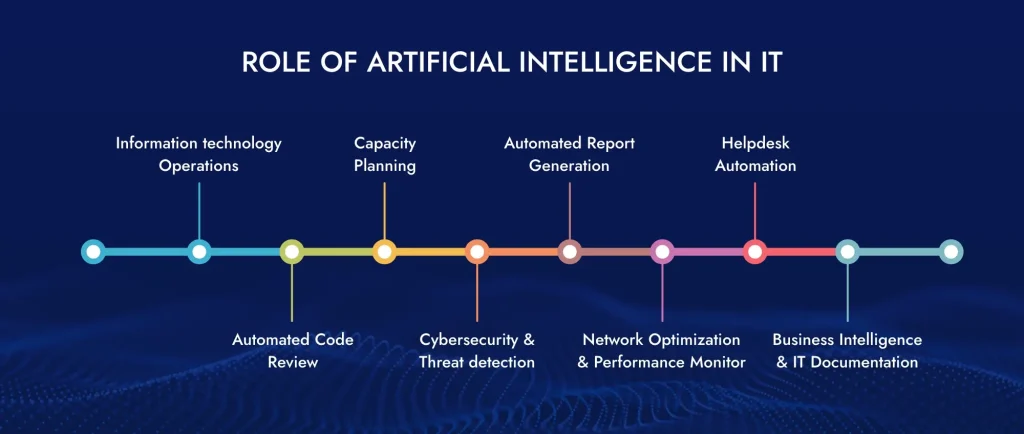
2. Understand Your Customers Better

Knowing more about your customers can help you serve them better. Data analytics can reveal quite a lot about who your customers are and what they like.

For instance, if you are running a small online store:

  • Data would show you which products people often buy together.
  • You could use this to recommend related items to your customers and increase sales.
  • You can also find out at what time of the day people shop the most, thus helping you run your promotions correspondingly.

A data analytics consulting services company will help gather customer information and implement it in your business.

3. Save Money and Work Smarter

Knowing where you are wasting some money or time in your business can be said by your data. It lets you work smarter and more efficiently, thereby saving costs.

If you own a small logistics business:

  • Data could help you find the quickest delivery routes.
  • You can find out which days you need more drivers and which days you don’t. This could help you save on fuel and pay less over time.

A data consultant will take a detailed view of your business processes and find ways of making them work better.

4. Stay Ahead of Competitors

In business today, using data well will help you to have an edge over other businesses; it will enable you to spot new opportunities earlier than others.

For instance, you own a fitness studio and have an app for that:

  • Data might tell you what new fitness trends are becoming popular in your area.
  • You could use that information to offer new classes before any other gyms do.
  • You may also find out when your busy times are so you can schedule classes on dates and times that best meet demand.

Bring in a data consultant who can help you use the data to keep well out in front of your market.

5. Grow Your Business

Perhaps more importantly, using data can help you earn more. With a better understanding of your customers and making wiser decisions based on it, you can increase your sales and profit.

For instance, a small clothing store may use data to:

  • Find out the most popular of the styles and stock more of them.
  • Identify your big buyers’ group and offer special deals to these customers.
  • Determine the best times to have sales to attract the most customers.

Now, a data consultant will help you recognize those opportunities for business growth.

Check: How AI Is Redefining Healthcare: 11 Transformative Applications

Implement data-driven strategies to drive business success. Prepare your small business with actionable data insights. Get in touch with our specialists today!

What Is the Role of Data Analytics Consulting Services?

Now that you have understood the need for data analytics consulting services and how they offer data insights to make smarter decisions, it is important to understand how data constants do it.

Data analytics consulting services offer a complete solution for small businesses looking to use their data for growth and success.

1. Data Strategy Development

The first procedural step of data consultants is to help small businesses create a goal, organize the plan for collecting and managing data, and analyze it.

2. Data Management

Making sure data is accurate, accessible, and secure is crucial for effective analytics. Consultants help small businesses organize, store, and protect their data.

3. Advanced Analytics

Advanced machine learning, predictive modeling, and data mining methods are some of the techniques used by a data analytics consultant to uncover hidden insights and patterns in business data.

4. Data Visualization

They present analyzed data in a clear and visually appealing way, which is essential for effective decision-making. Consultants use data visualization tools and interactive dashboards to communicate insights to decision-makers.

5. Training and Support

Data analytics consultants would, of course, provide training and support to enable small businesses to build their own data analytics capabilities.

By partnering with data analytics consulting services companies like ViitorCloud, small businesses can access the expertise and resources needed to effectively use their data and drive business success.

Also Read: What is supply chain digital transformation and why is it important?

Advance your company with Data Analytics Consulting. Drive business expansion with tailored data-driven solutions. Schedule a consultation today!

How Small Business Can Use Data Analytics Consulting: A Roadmap

For small businesses looking to start their data analytics journey, the following steps provide a roadmap for success:

  1. Define Your Goals: The first step is to have a clear vision of what you want to achieve through data analytics. For instance, improve customer retention, optimize marketing efforts, or streamline operations.
  2. Identify Data Sources: Identify which data is relevant to your analytics initiatives. Check internal databases, customer feedback, website analytics, and external market data. If you don’t have expertise in this, a data consulting services agency will help you with this.
  3. Partner with Experts: Always choose an experienced data analytics consultant to guide your initiatives, provide training, and ensure successful implementation. (We have explained below how to select the right data consulting services company.)

  4. Choose the Right Tools: Pick the right analytical tools and platforms for the budget and requirements. These may range from very user-friendly, like Google Analytics and Tableau, to more advanced ones, such as SAS and SAP Business Intelligence.

Through these steps and collaboration with a trusted data analytics consulting partner, small businesses can confidently move into the world of data analytics and explore new opportunities.

Check: Cloud Migration Consultancy Services for Businesses: Why Should You Consider This?

How to Select the Right Data Consulting Services Company for Your Small Business?

When looking for a data consultant, consider these things:

  • Do they know your type of business? Look for someone who has helped businesses like yours before.
  • Can they do everything you need? Make sure they can help with all parts of using data, from collecting it to making it useful.
  • Can they grow with you? Choose someone who can keep helping as your business gets bigger.
  • Do they use tools you can afford? Make sure they suggest data tools that fit your budget.
  • Are they good at explaining things? They should be able to talk about data in a way that makes sense to you.

Maximize ROI with strategic Data Analytics for informed decision-making. Professional services are available for business expansion. Contact us for a complimentary consultation.
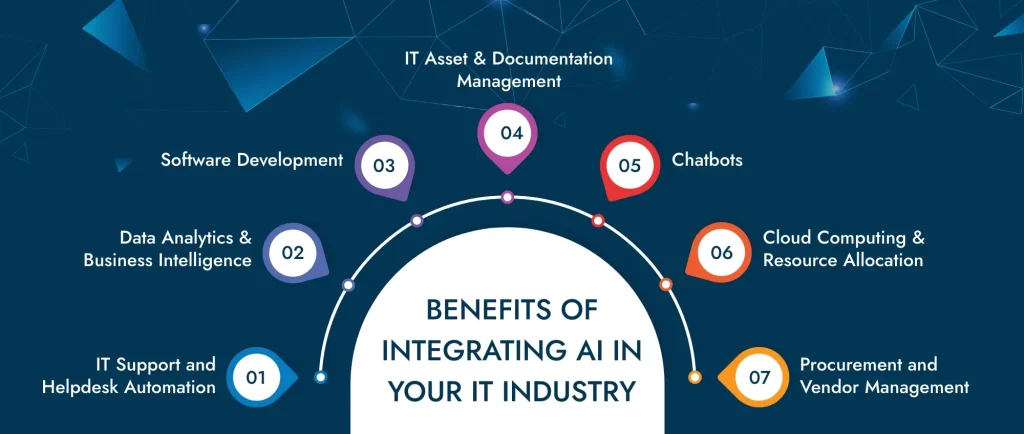
Final Thoughts

ViitorCloud’s data analytics consulting can be a big help for small businesses. It can help you understand your customers better, make smarter decisions, save money, stay ahead of competitors, and grow your business. While using data can be challenging, especially for small businesses, getting help from experts can make it much easier.

You can contact us for our data analytics services, and we will help you take advantage of the available data so that you can make decisions based on data science.

Frequently Asked Questions

Data analytics assists small businesses in making smart decisions by giving insights into customer behavior, market trends, and company performance. This can enable them to optimize their operations, reduce costs, and enhance customer experiences.

Data analytics contributes to business growth by recognizing new opportunities, predicting future trends, and helping companies stay ahead of the competition. It allows businesses to make data-driven decisions that drive revenue and profitability.

Data Analytics enables SMEs to perform their business strategy in a more efficient way by giving real-time intelligence that assists targeted marketing campaigns and the optimization of resource allocation. SMBs are empowered to make informed decisions and be agile in responding to changes within the market.
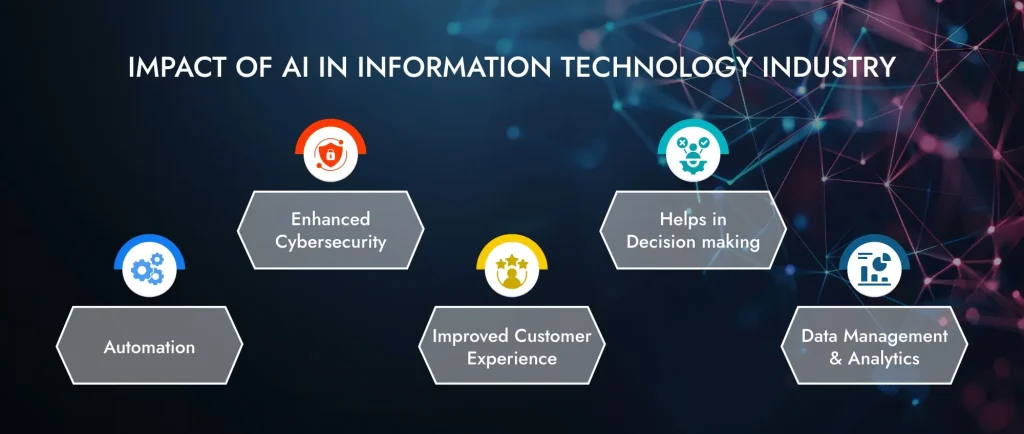
Data analytics enables a business to increase and grow its revenues by providing accurate data to the sales team, driving targeted marketing campaigns, reducing costs, and improving customer retention. This helps a company in finding growth opportunities by making data-driven decisions directly impacting the bottom line.